
TL;DR:
- Businesses should urgently implement multi-factor authentication, verify backups, and assign a privacy owner to strengthen data protection.
- Small and medium businesses must follow the Australian Signals Directorate’s Essential Eight controls at Maturity Level One to reduce cyber risks and comply with obligations under the NDB scheme.
To protect the personal data your business holds, do these five things now: enforce multi-factor authentication (MFA) on every account, apply the ASD Essential Eight at Maturity Level One, verify your backups and test a restore, assign a named owner for privacy and incident response, and prepare a short breach response plan aligned with the Notifiable Data Breaches (NDB) scheme.
Your 24–72 hour checklist:
- Confirm MFA is active on all Microsoft 365 accounts, including admin accounts
- Check whether your backup covers Exchange, SharePoint and Teams data, not just file servers
- Name one person responsible for privacy decisions and breach response
- Locate your most recent restore test result (if you cannot find one, run one today)
- Review whether your annual turnover or business type brings you under the Privacy Act and NDB scheme
If you are already dealing with a suspected breach, skip to the incident response section below. Otherwise, start at the top and work through this guide. IT Start can run a discovery session and rapid remediation plan for Brisbane SMBs, typically within the first week.
Table of Contents
- Why Australian SMBs must protect the personal data they hold
- What does the ASD Essential Eight baseline look like for your business?
- What to do if personal data has already been exposed
- Building a data inventory and keeping access under control
- Are your backups actually working?
- What does remediation actually cost and how long does it take?
- What we see go wrong in practice
- When should you bring in an MSP?
- Key takeaways
- What I actually see when we start working with a Brisbane SMB
- IT Start helps Brisbane SMBs get data protection right from day one
- Useful sources
- FAQ
Why Australian SMBs must protect the personal data they hold
Protecting the personal data your business holds reduces legal risk under the Privacy Act 1988 and the NDB scheme, and it builds the kind of customer trust that is genuinely hard to recover once lost.
The Privacy Act covers businesses with an annual turnover above $3 million, but that threshold is not the whole story. Private sector health service providers, credit providers, and businesses that trade in personal information are covered regardless of size. If you fall below the threshold, you can still opt in voluntarily under section 6EA, which places you on the OAIC opt-in register and requires a published, APP-compliant privacy policy.
“Even if a small business is not covered by the Privacy Act, protecting personal information is best practice and can be a competitive advantage. Opting in publicly signals good privacy practice.” — Office of the Australian Information Commissioner (OAIC)
The NDB scheme requires covered entities to notify both affected individuals and the OAIC as soon as practicable when an eligible data breach occurs. An eligible breach involves unauthorised access, disclosure or loss of personal information that is likely to result in serious harm to one or more individuals.
Pro Tip: Even if your turnover sits below $3 million, treat your business as though the Privacy Act applies. Your clients and employees expect it, and opting in costs very little compared to the reputational damage of a breach you had no plan for.
What does the ASD Essential Eight baseline look like for your business?
The ACSC recommends Maturity Level One of the Essential Eight as the minimum baseline for all small and medium businesses. For a Microsoft 365 environment with a typical SMB size, that translates into eight practical controls.
| Essential Eight control | SME action |
|---|---|
| Application control | Block unapproved apps from running; use Microsoft Defender Application Control or Intune policies |
| Patch applications | Apply patches promptly; prioritise internet-facing software (browsers, Office, Adobe) |
| Configure Microsoft Office macros | Disable macros by default; allow only signed macros from trusted publishers |
| User application hardening | Disable Flash, ads and Java in browsers; configure Edge or Chrome via Intune |
| Restrict admin privileges | Remove local admin rights from standard users; use separate admin accounts for IT tasks |
| Patch operating systems | Apply OS patches regularly; replace unsupported systems when needed |
| Multi-factor authentication | Enforce MFA on Microsoft 365, VPNs, remote desktop and all admin accounts |
| Regular backups | Daily encrypted backups, tested restores, copies isolated from production |
For Microsoft 365 specifically, check these three things in week one:
- Open the Microsoft 365 admin centre and confirm MFA is enforced via Conditional Access, not just “enabled” (enabled means users can skip it).
- Confirm your backup tool covers Exchange Online, SharePoint and Teams, not just OneDrive sync.
- Check that your global admin accounts are cloud-only, have no mailboxes attached, and use phishing-resistant MFA.
For a deeper walkthrough of each control, the IT Start Essential Eight guide for Brisbane SMEs maps each step to real SMB configurations.
What to do if personal data has already been exposed
Contain first. Then assess. Then notify if required.
Under the NDB scheme, an entity must notify affected individuals and the OAIC about an eligible data breach — one involving unauthorised access, disclosure or loss of personal information that is likely to result in serious harm — as soon as practicable after becoming aware of it. OAIC, Part 4 NDB Scheme
The OAIC four-step process is: contain, assess, notify (if required), review. Here is what that looks like in practice for a 10–50 person business:
Hours 0–24: Isolate affected accounts. Revoke compromised credentials. Preserve logs — do not delete anything. Identify what personal information was involved (names, health records, financial data, tax file numbers).
Hours 24–72: Assess whether the breach is likely to cause serious harm. Consider the sensitivity of the data, who may have accessed it, and whether encryption was in place. If serious harm is likely, you are required to notify.
Notification: The OAIC provides an online NDB notification form and sample statement guidance. Your statement must include the entity’s name, a description of the breach, the kinds of information involved, and what steps affected individuals should take. You can notify directly or via a public statement if direct contact is not reasonably practicable.
“As soon as practicable” is not defined as a fixed number of hours in the legislation, but 72 hours is a reasonable internal target for completing your assessment and preparing notification. Delays in containment are the most common mistake we see.
Building a data inventory and keeping access under control
You cannot protect what you do not know you hold. A simple data inventory is the foundation of every other control in this guide.
- List every category of personal information your business collects (customer names, employee records, health data, payment details).
- Record where each category is stored (Microsoft 365, accounting software, CRM, paper files).
- Note who has access and whether that access is still needed.
- Record the retention period and the vendor or hosting location for each system.
- Review this inventory every 6–12 months and after any significant system change.
For access reviews in Microsoft 365, run an Entra ID (formerly Azure AD) access review quarterly. Remove stale accounts, revoke shared mailbox access that is no longer needed, and audit who holds global admin or SharePoint admin roles. The principle is simple: every person should have the minimum access needed to do their job, nothing more.
When vetting cloud vendors and subcontractors, ask: Where is data stored (is it in Australia)? What is your breach notification timeline? What security certifications do you hold? What happens to our data if we end the contract? Get the answers in writing before signing.
Pro Tip: Assign one named person inside the business to own the data inventory and privacy decisions. It does not need to be a full-time role, but someone must be accountable. Without a named owner, nothing gets reviewed and nothing gets updated.
Are your backups actually working?
Honestly, this is where most Brisbane SMBs have a false sense of security. We regularly find businesses that think they are backed up when they are not.
The most common scenario: Microsoft 365 is in use, OneDrive sync is on, and the business owner believes that means everything is backed up. OneDrive sync is not a backup. If a file is deleted or ransomware encrypts it, the sync replicates the damage.
Common failures we see:
- Shadow copies only, with no offsite or cloud copy
- Backups covering only the file server, missing Exchange Online, SharePoint and Teams
- No tested restore in the past 12 months
- Backup credentials stored in the same environment as production (so ransomware can reach them)
Your backup verification checklist:
- Coverage: does the backup include Microsoft 365 mailboxes, SharePoint, Teams and any on-premises servers?
- Isolation: is at least one copy air-gapped or immutable (cannot be deleted by ransomware)?
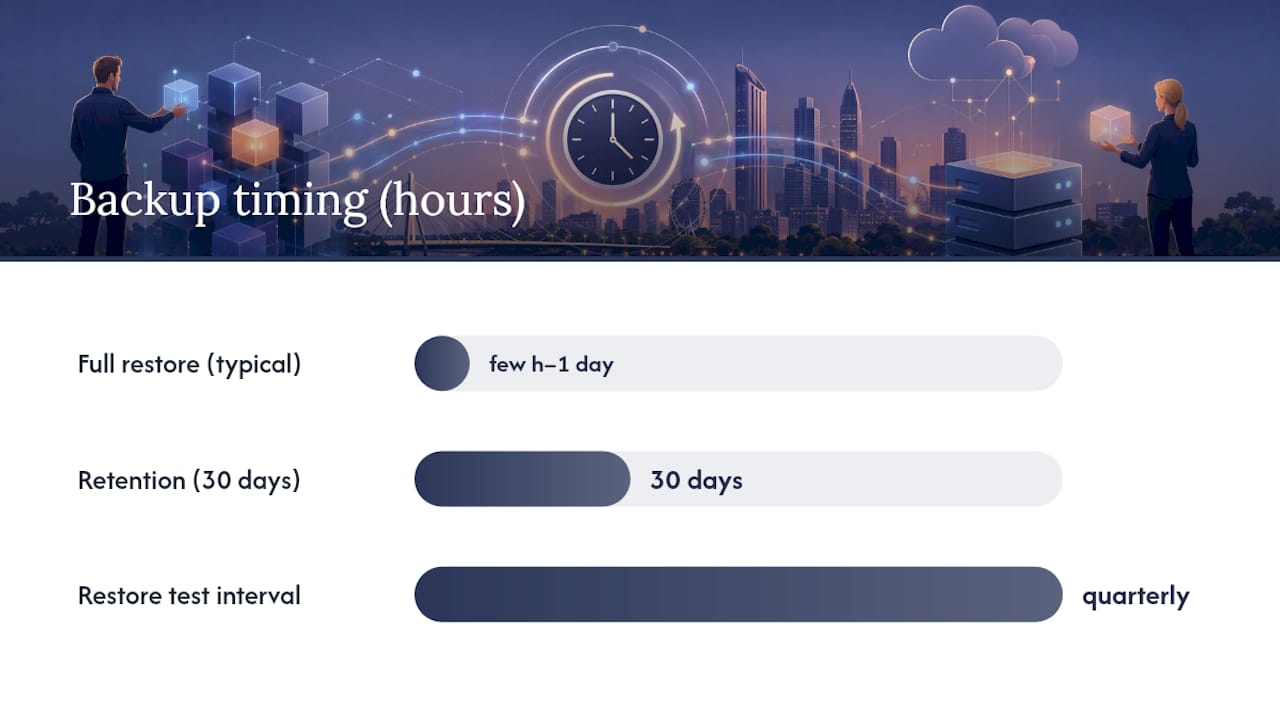
- Retention: are you keeping at least 30 days of daily backups?
- Encryption: are backups encrypted at rest and in transit?
- Restore test: when was the last successful restore test, and was personal information integrity verified?
For a small to medium business, a full restore from a clean backup typically takes from a few hours up to about a day depending on data volume and infrastructure. That window matters when you are assessing breach impact.
Pro Tip: Run a restore test every quarter. Pick a mailbox, a SharePoint site and a file share. Restore them to a test environment and confirm the data is intact. Document the result. If you cannot produce a restore test record, your backup is theoretical.
What does remediation actually cost and how long does it take?
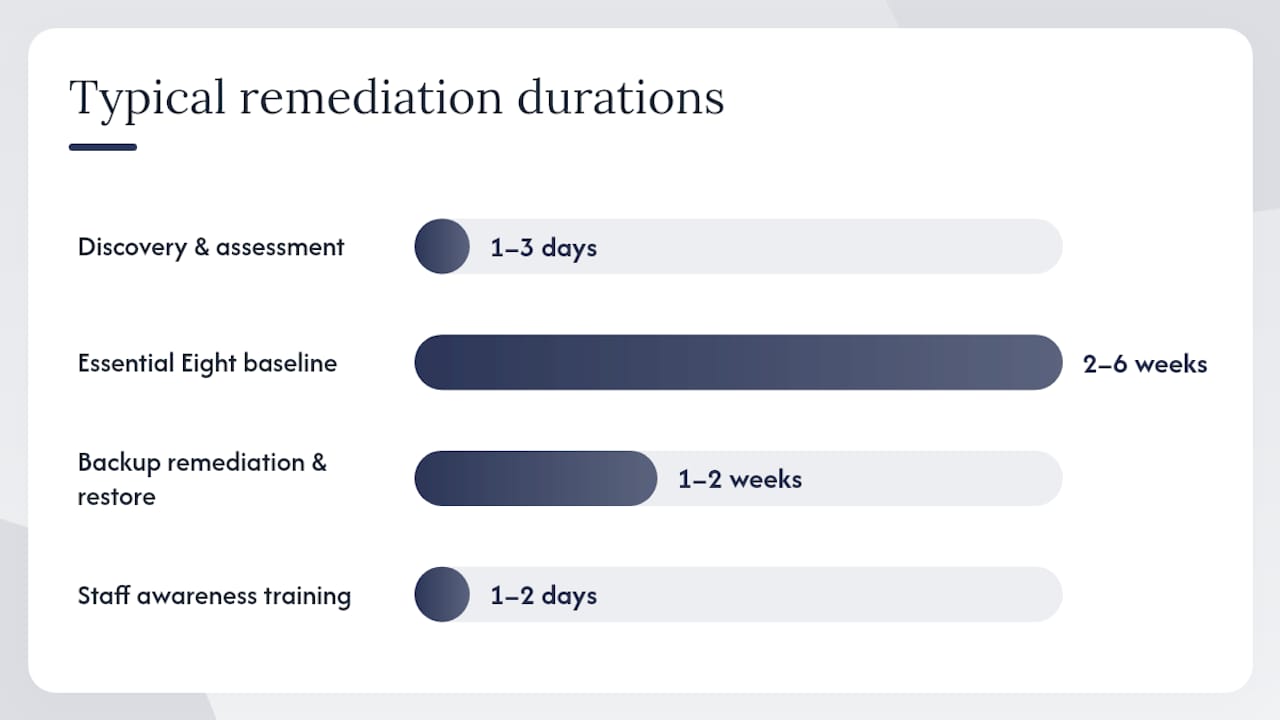
Initial baseline remediation for a 10–50 staff SMB typically takes 2–8 weeks, depending on how much legacy infrastructure is involved. Ongoing managed security and backups are a monthly cost.
| Activity | Typical timeline | Ballpark cost (AUD) |
|---|---|---|
| Discovery and gap assessment | 1–3 days | — |
| Essential Eight Maturity Level One baseline | 2–6 weeks | — |
| Backup remediation and verified restore | 1–2 weeks | — |
| Staff awareness training | 1–2 days | — |
| Ongoing managed security and backups | Monthly | — |
Variables that shift cost: number of mailboxes, legacy on-premises servers, third-party SaaS platforms with no API backup support, and unmanaged endpoints (personal devices used for work with no MDM).
Priority schedule:
- Days 0–30: MFA on all accounts, backup verification, assign privacy owner, patch critical vulnerabilities
- Days 30–90: Full Essential Eight baseline, access reviews, data inventory, vendor contract checks
- Ongoing: Monthly patching, quarterly restore tests, annual privacy review, staff training refreshers
What we see go wrong in practice
The usual failure pattern is no MFA, unclear backups, shared admin accounts and out-of-date patching. We see this combination constantly.
A typical scenario: a 20-person professional services firm in Brisbane. No MFA on Microsoft 365. A staff member’s account is compromised via a phishing email. The attacker sits in the mailbox for three weeks before anyone notices. By then, client contact lists, invoices and employment contracts have been exfiltrated. The business had no incident response plan, no named privacy owner, and no idea whether they were covered by the NDB scheme.
Red flags that should trigger an immediate review:
- No MFA on any admin or user accounts
- Single backup repository with no offsite or immutable copy
- Shared admin credentials used by multiple people
- Endpoints not patched in the past 60 days
- No record of who has access to what
What makes recovery harder: businesses that delete logs thinking they are cleaning up, or that wait days before containing an account because they are not sure it is a real breach. Preserve everything. Contain fast. Assess second.
For more real-world scenarios, the IT Start secure IT environment guide for Brisbane SMEs covers common failure patterns and remediation steps.
When should you bring in an MSP?
Bring in an MSP if you cannot answer yes to all three of these: Do you have a named security owner? Have you tested a backup restore in the last 90 days? Are patches applied within 30 days across all devices?
Questions to ask any MSP you are vetting:
- Can you show evidence of Essential Eight Maturity Level One implementations for businesses our size?
- What is your incident response time and what does your breach response process look like?
- Do you back up Microsoft 365 mailboxes, SharePoint and Teams separately from OneDrive?
- What does your monthly reporting cover and how do we access it?
- Do you hold SMB 1001 Gold certification or equivalent?
What to require in the contract:
- Monthly security and patching reports
- Quarterly restore test results with documented success criteria
- Access to incident response runbooks
- Clear SLAs for response time (critical incidents vs standard requests)
Red flags when vetting an MSP:
- Cannot demonstrate a completed Essential Eight assessment for an SMB client
- No documented restore test process
- Vague answers about where your data is stored
- No local Brisbane references or presence
- Pushes you to sign a long contract before completing a discovery session
IT Start holds SMB 1001 Gold certification and works exclusively with Brisbane-based SMBs on managed IT, cloud and cyber security engagements.
Key takeaways
Protecting personal data for a Brisbane SMB requires MFA, verified backups, an Essential Eight baseline, a named privacy owner, and a documented NDB response plan, all achievable within 30–90 days.
| Point | Details |
|---|---|
| MFA is the first control | Enforce MFA via Conditional Access in Microsoft 365 before any other change. |
| Backups need testing, not just running | Verify coverage includes Microsoft 365 data and run a restore test quarterly. |
| NDB obligations apply broadly | Businesses over the Privacy Act turnover threshold, health providers and others must notify OAIC of eligible breaches. |
| Essential Eight Maturity Level One is the baseline | The ACSC recommends this as the minimum for all Australian SMBs. |
| IT Start for Brisbane SMBs | IT Start runs discovery, Essential Eight remediation and managed security for 10–50 staff businesses in Brisbane. |
What I actually see when we start working with a Brisbane SMB
Most businesses that come to us genuinely believe their data is protected. They have Microsoft 365, they have some kind of backup running, and someone in the office “handles IT.” What we find in practice is almost always different.
No MFA on admin accounts. Backups that cover the file server but nothing in Microsoft 365. A single person who does IT as a side task alongside their real job. No one who could tell you, right now, what personal information the business holds or where it lives.
The good news is that the gap between where most SMBs start and where they need to be is not enormous. The Essential Eight at Maturity Level One is not a complex enterprise project. Verified backups and MFA can be in place within a week. A data inventory takes a day to build if someone sits down and does it.
What changes the cost and timeline is legacy infrastructure, unmanaged devices and the absence of any documentation. The businesses that spend the most on remediation are the ones that waited until after an incident to start.
If you want a straight answer on where your business stands, a 30-minute discovery call with IT Start is the fastest way to find out.
IT Start helps Brisbane SMBs get data protection right from day one
Brisbane SMBs that need to close the gap between where they are and where the Essential Eight baseline sits do not need a large enterprise project. They need a clear plan, someone who has done it before, and a partner who will still be answering the phone when something goes wrong.
IT Start manages Microsoft 365, security, backups and networking for 10–50 staff businesses across Brisbane. The first step is a discovery session, typically completed in one to three days, that maps your current state against the Essential Eight and identifies the highest-risk gaps. From there, remediation is prioritised by risk, not by what is easiest to sell.
Services include managed cyber security with Essential Eight implementation, cloud services including Microsoft 365 management and backup, and ongoing managed IT support with monthly reporting and quarterly restore testing. IT Start holds SMB 1001 Gold certification.
Book a discovery call at itstart.com.au/cyber-security to get a clear picture of your current risk and a prioritised remediation plan.
Useful sources
- When to report a data breach | OAIC — covers eligible breach criteria and notification obligations under the NDB scheme
- Quick reference guide for responding to data breaches | OAIC — four-step response process and OAIC notification form
- Part 4: NDB Scheme | OAIC — which entities are covered and what notification must include
- Small business | OAIC — turnover threshold, exemptions and opting in
- Opting in to the Privacy Act | OAIC — how to opt in under section 6EA
- Chapter B: Key concepts | OAIC — definitions of personal information, sensitive information and Australian link
- ACSC Small Business Cyber Security Guide — practical starting controls: MFA, patching, backups
FAQ
Does the Privacy Act apply to small businesses in Australia?
The Privacy Act applies to businesses with annual turnover above $3 million, private sector health providers, credit providers and businesses that trade in personal information. Smaller businesses can opt in voluntarily under section 6EA of the Act.
What counts as an eligible data breach under the NDB scheme?
An eligible data breach occurs when personal information is accessed, disclosed or lost without authorisation, and that incident is likely to result in serious harm to one or more individuals. Both conditions must be met before notification to the OAIC is required.
How quickly do you need to notify the OAIC after a breach?
Notification must happen as soon as practicable after the entity becomes aware of an eligible breach. A 72-hour internal assessment target is a practical guide, but the legal obligation is to notify without unnecessary delay once you have confirmed the breach is eligible.
What is the ASD Essential Eight and why does it matter for SMBs?
The Essential Eight is a set of eight cyber security controls developed by the Australian Signals Directorate. The ACSC recommends Maturity Level One as the minimum baseline for all Australian small and medium businesses, covering MFA, patching, backups and application controls.
How can IT Start help with data protection for a Brisbane SMB?
IT Start runs discovery assessments, Essential Eight baseline remediation, Microsoft 365 backup implementation and ongoing managed security for Brisbane businesses with 10–50 staff. The process starts with a discovery session that maps your current gaps and produces a prioritised remediation plan.