
TL;DR:
- Reliable local IT support in Brisbane involves proactive management, clear SLAs, and onsite technicians familiar with SMB needs. Businesses should prepare documentation and verify backup tests before engaging providers to ensure effective, cybersecurity-minded support. Choosing a provider with a strong local presence, transparent pricing, and proven responsiveness helps avoid costly downtime and security gaps.
Local IT support in Brisbane is defined as business-grade technical assistance delivered by technicians physically based in the Brisbane metro area, covering managed services, cybersecurity, helpdesk, and onsite response. For small to medium businesses, finding the right provider is not a minor admin task. The wrong choice costs you downtime, security gaps, and money spent on reactive fixes that never actually solve anything. This guide walks you through how to find local IT support in Brisbane, what to look for, what to avoid, and how to build a relationship with a provider that actually helps your business run better.
What IT services do brisbane smbs actually need?
The core services any credible local tech support provider in Brisbane must offer are managed IT services, helpdesk support, onsite response, and cybersecurity. If a provider only does break-fix work, meaning they show up when something breaks and charge by the hour, that is not business-grade support. That is a tradesperson model applied to IT, and it leaves your business exposed.
Managed IT services cover proactive monitoring, patch management, and system health checks. Proactive IT management outperforms reactive repair-only models for SMB business continuity and security. The reason is simple: most outages and breaches are preventable if someone is watching your systems before things go wrong.
Cybersecurity is non-negotiable in 2026. Brisbane SMBs in financial services, healthcare, and legal are prime targets for phishing and ransomware. Your provider should be handling multi-factor authentication, endpoint protection, and backup verification as standard, not as add-ons.
Pro Tip: Ask any prospective provider to show you a sample monitoring report. If they cannot produce one, they are not actually monitoring your systems.
Onsite support matters more than most providers admit. Local Brisbane presence enables faster onsite response and a better understanding of SMB needs than remote-only providers. When your server room floods or your network switch dies, you need a technician in the building, not someone on a video call.
Key services to confirm before signing anything:
- Proactive monitoring and alerting
- Patch management for Windows, Microsoft 365, and third-party software
- Managed backups with tested restores
- Helpdesk access during your business hours
- Onsite response with a defined timeframe
- Basic cybersecurity including MFA and endpoint protection
What should you prepare before engaging IT support?
Most businesses come to a new IT provider completely unprepared, and that slows everything down. Getting your documentation in order before the first meeting saves weeks of onboarding time and gives you a clearer picture of what you are actually paying for.
| Preparation Item | Why It Matters |
|---|---|
| IT asset register | Lists all computers, servers, printers, and network gear so nothing gets missed |
| Network diagram | Shows how your systems connect and where the risks are |
| Current software licences | Avoids duplicate spending and reveals unlicensed software |
| Existing support contracts | Clarifies notice periods and exit clauses before switching providers |
| Backup configuration details | Confirms whether backups are actually running and where data is stored |
| After-hours contact requirements | Defines whether you need 24/7 support or business-hours-only coverage |
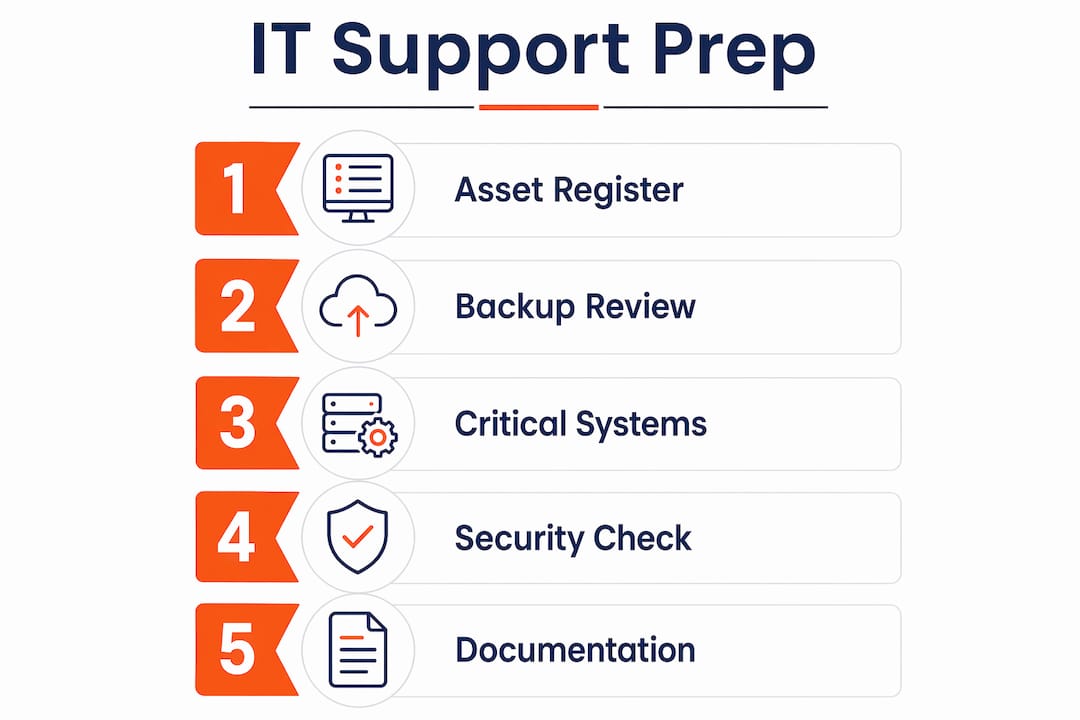
Honestly, the backup situation is where we see the biggest gap. Most businesses think they are backed up because someone set something up years ago. Half the time, the backup has been failing silently for months. Before you engage any provider, run a restore test on your most critical data. If you cannot do that yourself, make it the first thing you ask your new provider to verify.
Pro Tip: Write down your three most critical business systems before your first provider meeting. If a provider does not ask about those systems in the first conversation, they are not thinking about your business.
Understanding your current security posture also helps. If you have no MFA on Microsoft 365, no endpoint detection, and backups stored only on a local drive, say so upfront. A good provider will not judge you for it. They will prioritise fixing it.
How do you evaluate and select the right provider?
Choosing between Brisbane IT support providers comes down to four things: response time guarantees, service scope, pricing transparency, and local reputation. Most businesses focus only on price and regret it within six months.

Response time is where contracts get vague. Many providers only offer “best effort” onsite support with no contractual SLAs outside business hours. That is a problem if your business runs early mornings, evenings, or weekends. Get the response time written into the contract, not just mentioned in a sales conversation.
For onsite support, same-day response in Brisbane typically happens within 2–4 hours when requested before the late morning cutoff. That is a realistic benchmark. If a provider promises one-hour response across all of Brisbane metro at any time of day, push back and ask how many technicians they have on the ground.
| Evaluation Criteria | What to Look For | Red Flag |
|---|---|---|
| Response SLA | Written guarantee in the contract | “Best effort” language only |
| Service scope | Proactive monitoring included | Reactive break-fix only |
| Cybersecurity | MFA, endpoint protection, backup management | Security sold as an optional extra |
| Pricing model | Fixed monthly fee per user or device | Hourly billing with no cap |
| Local presence | Brisbane-based technicians | All support delivered remotely |
| Service guarantee | No-fix no-fee or satisfaction policy | No accountability clause |
Providers like Geeks Brisbane offer a no-fix no-fee guarantee with seven-day availability across Brisbane metro. That kind of accountability matters. It tells you the provider is confident in their work. Interactive’s Brisbane team delivers managed IT with proactive patching and owns its own data centre for local hosting, which reduces latency and keeps your data onshore.
Check Google reviews and ask for two or three client references in your industry. A provider who works with law firms or medical practices understands compliance requirements. A provider who mostly does home users probably does not.
- Ask for a written SLA before signing
- Confirm after-hours support terms explicitly
- Request a sample monthly report
- Verify the provider carries professional indemnity insurance
- Check whether technicians are employees or contractors
What mistakes do brisbane smbs make when choosing IT support?
The most common mistake is treating IT support like a commodity purchase. You pick the cheapest option, assume it covers everything, and find out six months later that backups were not included, after-hours support costs extra, and your “managed service” is actually just remote helpdesk with no monitoring.
SMBs often mistake home-user IT support for business-grade services, leading to inadequate protection. A technician who fixes home computers on weekends is not equipped to manage a 20-person Microsoft 365 environment with compliance requirements. The skills, tools, and accountability are completely different.
Contract details are where businesses get caught out. Unclear contract terms around response times and after-hours availability cause real frustration when something goes wrong at 7pm on a Friday. Read the contract. If it says “reasonable endeavours” instead of a specific timeframe, negotiate or walk away.
Cybersecurity is still treated as optional by too many Brisbane SMBs. Businesses that skip proactive patching and monitoring face significantly higher risks of breaches and unexpected downtime. The Australian Cyber Security Centre reports that most successful attacks exploit known vulnerabilities that patches would have fixed. That is not a sophisticated attack. That is a maintenance failure.
Pro Tip: Always ask for a 30-day exit clause in your initial contract. If a provider refuses, that tells you everything you need to know about how they handle unhappy clients.
Other mistakes we see regularly:
- Signing a 24-month contract without a performance review clause
- Not asking who answers the phone when you call the helpdesk
- Assuming cloud storage equals a backup (it does not)
- Choosing a provider based on a referral without checking their SMB credentials
What does an ongoing IT support partnership actually look like?
A productive relationship with your IT provider is not just about logging tickets when things break. The best managed IT services in Brisbane operate as an extension of your business, not a vendor you call in emergencies.
Schedule a quarterly business review with your provider. Use it to check system health, review any security incidents, plan upcoming hardware refreshes, and confirm your backup restores are working. Most SMBs never do this and then wonder why their IT feels chaotic.
Clear escalation paths matter more than most business owners realise. You should know exactly who to call for a critical outage, what the expected response is, and how long before an issue gets escalated to a senior technician. If your provider cannot answer those questions clearly, that is a gap.
The advantages of proactive IT support for Brisbane SMBs include fewer surprise outages, lower average cost per incident, and better security posture over time. Proactive management is not just a marketing term. It means your provider is catching problems before they affect your staff, not after.
Practical habits that make the partnership work:
- Assign one internal contact as the IT liaison for your business
- Report issues as soon as they appear, not after a week of workarounds
- Give your provider advance notice of staff changes, office moves, or new software
- Review your IT spend annually against actual service delivery
Key takeaways
Reliable local IT support in Brisbane requires a provider with written SLAs, proactive management, local technicians, and clear cybersecurity coverage built into the base service.
| Point | Details |
|---|---|
| Proactive over reactive | Choose managed IT services that monitor and patch systems before problems occur. |
| Written SLAs are non-negotiable | Confirm response times for both business hours and after-hours in the contract. |
| Local presence matters | Brisbane-based technicians deliver faster onsite response than remote-only providers. |
| Prepare before you engage | Have your asset list, backup details, and software licences ready before the first meeting. |
| Cybersecurity is not optional | MFA, endpoint protection, and tested backups must be included, not sold as extras. |
What i have learned working with brisbane smbs
Honestly, the thing that surprises me most is how many Brisbane businesses are paying for IT support and still have no idea if their backups work. We see this constantly. A business has been with the same provider for three years, paying a monthly fee, and when we ask to see a restore test, nobody can produce one. That is not support. That is a subscription to false confidence.
The break-fix model sounds appealing because it feels cheaper. You only pay when something breaks. But the maths does not work out. One server failure, one ransomware incident, one week of downtime costs more than a year of proactive managed services. I have seen it happen to businesses that thought they were being smart about IT costs.
Local presence is not just a marketing point. When a client’s network switch died at 8am on a Monday and 15 staff could not work, the value of having a technician on-site within 90 minutes was obvious. A remote-only provider would have been troubleshooting blind for hours. The physical proximity of your IT team is a genuine operational advantage.
My honest advice: treat IT support as a business-critical function, not an afterthought. Interview providers the same way you would interview a senior hire. Ask hard questions about what happens when things go wrong, not just how good things will be when everything works.
— Matt
How IT start supports brisbane smbs
IT Start is a Brisbane-based managed IT provider built specifically for small and medium businesses. The team handles business IT support including proactive monitoring, Microsoft 365 management, helpdesk, and onsite response across Brisbane. For businesses with compliance requirements or higher security risk, IT Start’s cybersecurity services cover risk assessments, MFA deployment, and ongoing threat monitoring. Cloud infrastructure and hosted environments are available through IT Start’s cloud services for businesses moving away from on-premise servers. If you want to know where your IT currently stands, IT Start offers a free assessment with no obligation.
FAQ
What is local IT support for brisbane businesses?
Local IT support for Brisbane businesses means managed technical services delivered by technicians physically based in the Brisbane metro area. It covers helpdesk, onsite response, cybersecurity, and proactive monitoring tailored for SMBs.
How quickly can brisbane IT support providers respond onsite?
Same-day onsite support in Brisbane typically arrives within 2–4 hours when requested before the late morning cutoff. Response times vary by provider and should be confirmed in writing before signing a contract.
What is the difference between managed IT and break-fix support?
Managed IT services include proactive monitoring, patching, and regular system health checks for a fixed monthly fee. Break-fix support only responds after something fails, which leaves businesses exposed to preventable outages and security incidents.
How do i know if my current IT provider is doing a good job?
Ask for a monthly report showing monitoring alerts, patches applied, and backup status. If your provider cannot produce that report, they are likely not actively managing your systems.
What should a brisbane SMB budget for IT support?
Pricing varies based on user count, service scope, and security requirements. Fixed monthly per-user pricing is the most transparent model and makes budgeting predictable. Avoid providers who only quote hourly rates with no cap.