TL;DR:
- Most IT support technician job descriptions are overly generic and fail to reflect the role’s true scope. Clear, outcome-focused descriptions that specify tools, certifications, and responsibilities attract candidates who can genuinely support business needs. Mismatched roles and vague expectations lead to high turnover and wasted recruitment efforts.
Most hiring managers write an IT support technician job description that reads like a generic shopping list. “Fix computers. Reset passwords. Help users.” And then they wonder why they end up with candidates who can’t handle a Microsoft 365 tenant migration or have never touched a ticketing system in their life. The IT support technician role, formally referred to in Australian industry classification as an ICT Support Technician, covers far more ground than most job ads acknowledge. Getting the description right from the start is the difference between hiring someone who genuinely supports your business and hiring someone who’ll be out the door in six months.
Key takeaways
| Point | Details |
|---|---|
| Broad role scope | ICT support technicians handle far more than hardware fixes, including identity management, SaaS tools, and onboarding. |
| Certifications matter | Specify CompTIA A+, ITIL 4, or Microsoft certs to attract candidates with proven, structured knowledge. |
| Level clarity reduces noise | Distinguishing between help desk, technician, and engineer roles cuts down on mismatched applications. |
| Outcome-focused language works | Framing duties around user productivity and uptime attracts candidates who understand business impact. |
| Tool specificity is non-negotiable | Naming your ticketing system and ITSM processes filters for candidates ready to contribute from day one. |
What an IT support technician job description must include
Let’s be clear about what ICT support technicians actually do in 2026. Their responsibilities span installing software, implementing networks, adapting programs, repairing peripherals, and responding to a broad range of user and infrastructure inquiries. That’s the official scope, and it’s broader than most job ads reflect.

When you’re writing the duties section, think in terms of the actual day your technician will have, not a theoretical list of IT tasks.
Here’s what that looks like in practice:
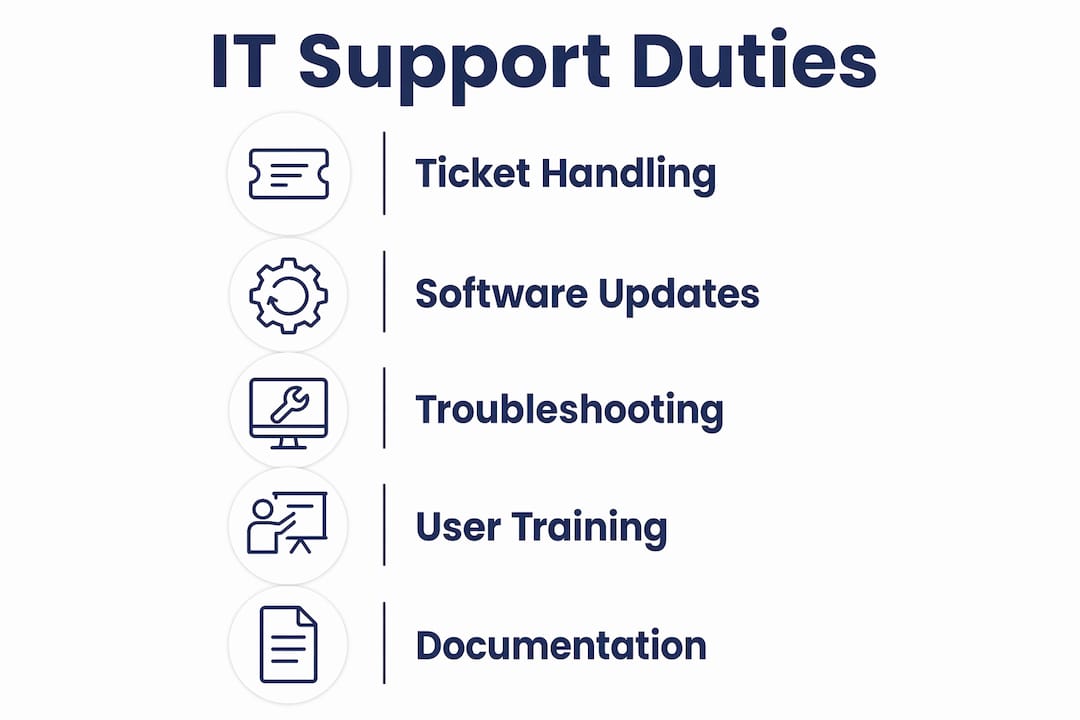
- User support and troubleshooting: Diagnosing and resolving hardware, software, and network issues across desktops, laptops, mobile devices, and peripherals. This includes both remote and on-site support depending on your workplace setup.
- Device configuration and maintenance: Setting up new machines, applying software updates, managing antivirus and endpoint protection, and maintaining asset registers.
- Ticketing and service request management: Logging, triaging, and resolving tickets through your ITSM platform. Structured ticket handling within ITIL/ITSM frameworks separates organised support from reactive chaos.
- Employee IT lifecycle management: Onboarding and offboarding staff, including account creation, access provisioning, device setup, and deactivation. This is commonly called joiner/mover/leaver management.
- Proactive infrastructure support: Monitoring alerts, contributing to documentation, and supporting the maintenance of your internal IT environment, including cloud services and SaaS tools.
Core duties in 2026 consistently include resolving support requests, handling installs and updates, and logging every interaction through a ticketing system. If your job description doesn’t reflect that, you’re describing a different job.
Pro Tip: Add a “typical day” paragraph to your job description. Something like: “You’ll start by reviewing overnight alerts, work through the ticket queue, and assist staff with device issues across our Brisbane office.” This gives candidates a real picture and filters out those who expect only reactive, ad hoc work.
Skills and qualifications to specify
This is where most job descriptions either go too vague or get unrealistic. Asking for ten years of experience for a Level 1 support role, or not specifying any tools at all, both create the same problem: you attract the wrong people.
Here’s what to include based on role level and your environment:
- Technical competencies: Networking fundamentals (TCP/IP, DNS, DHCP), Windows and macOS troubleshooting, Microsoft 365 administration, hardware fault diagnosis, and basic scripting for automation tasks.
- Certifications: CompTIA A+ and Network+ remain the baseline in 2026. For more senior positions, Microsoft endpoint certifications and ITIL 4 Foundation are worth specifying. These aren’t just credentials. They signal that a candidate understands structured processes, not just ad hoc fixes.
- Soft skills: Communication and problem-solving are often what separate good technicians from great ones. Your technician will spend most of their day talking to non-technical staff, explaining issues in plain language and managing expectations under pressure.
- ITSM tool experience: Listing tools like ServiceNow and referencing ITIL 4 in your job description attracts candidates already familiar with structured, process-driven support. This matters more than most hiring managers realise.
Experience expectations depend heavily on your environment. Some companies need 2+ years with specific platforms, while others are happy to bring on a motivated junior with the right certifications and attitude. The key is being explicit. “Experience with Jira Service Management preferred” is far more useful than “experience with IT tools required.”
Pro Tip: If your business runs Microsoft 365, say so in the job description and ask for Microsoft 365 administration experience specifically. You’ll halve your screening time and double the quality of applications.
Role levels and how they differ
One of the most common mistakes in hiring for IT support roles is conflating different seniority levels or confusing similar job titles. Here’s a clear breakdown:
| Role title | Typical experience | Core focus | Example tasks |
|---|---|---|---|
| Help desk technician | 0 to 2 years | Tier 1 user support | Password resets, basic troubleshooting, ticket logging |
| IT support technician | 1 to 4 years | Tier 1 to 2 support | Device setup, software issues, network troubleshooting |
| IT support engineer | 3 to 6+ years | Tier 2 to 3, infrastructure | Identity administration, SaaS ecosystem management, escalations |
The distinction matters because the responsibilities at each level are genuinely different, not just incremental. An IT support engineer might own the joiner/mover/leaver workflow end to end, manage access reviews, and handle identity provider configuration. A help desk technician handles the day-to-day queue and escalates anything complex.
Some businesses also manage 100 or more SaaS tools across their environment. If that’s your situation, it belongs in the job description because it changes the complexity of the role significantly.
For employers building out an IT support function for the first time, it’s worth getting clear on where the role sits before you write a single word of the job ad. A misclassified role doesn’t just attract the wrong candidates. It sets unrealistic expectations that lead to turnover.
How to write a job description that actually works
A well-written IT support technician job description does two things at once. It attracts the right candidates and puts off the wrong ones. That’s a feature, not a bug.
Here’s what to get right:
- Use outcome-focused language. Instead of “provide technical support,” write “reduce downtime for staff by resolving hardware and software issues within agreed SLA timeframes.” That phrasing tells a candidate what success looks like, not just what they’ll be doing.
- Be specific about physical or on-call requirements. If the role involves visiting client sites, lifting equipment, or being available outside business hours, say it plainly. Surprises after hire create resentment fast.
- Name your tools and processes. If you use Microsoft Intune for device management, Jira for tickets, and Microsoft Entra for identity, put that in the description. Specifying ITSM tools and process maturity helps attract candidates who already work the way you do.
- Include organisational context. “You’ll be supporting 45 staff across two Brisbane offices” is worth ten lines of generic duty statements. Candidates want to know the scale, the environment, and what they’re walking into.
- Clarify scope ownership. Articulating ownership scope clearly avoids candidate misinterpretation. If you want someone to own account lifecycle management from start to finish, say that. If they’re just executing tickets, say that instead.
Framing IT support roles around user productivity rather than a list of tasks is consistently linked to better quality applications and clearer candidate expectations. This isn’t a soft suggestion. It’s a structural shift in how you write the role.
What I’ve learned from watching these hires go wrong
Honestly, I’ve seen this pattern more times than I can count. A Brisbane SMB with 30 staff writes a vague IT support ad, gets 80 applications from people with wildly different skill sets, spends three weeks screening, and ends up hiring someone who leaves after four months because the role wasn’t what they expected.
The job description wasn’t the only problem, but it was where the problem started.
What I’ve noticed is that the best descriptions are the ones that treat the candidate like an adult. They explain the actual environment, the tools used, the ticket volume, and what a good week looks like. They don’t dress the role up in buzzwords or hide the less glamorous parts. When you write “you’ll be the primary point of contact for all IT issues across our office,” that’s honest. Candidates who want that responsibility will lean in. Candidates who wanted a quiet infrastructure role will self-select out.
The human element also gets underestimated. Technical skills alone aren’t the deciding factor. A technician who can explain a network outage to a stressed practice manager in plain language is worth far more than one who can’t. If your job description doesn’t mention communication skills, you’re signalling that you haven’t thought about the user-facing side of the role.
Well-crafted descriptions also reduce churn. When a candidate knows what they’re walking into, they’re less likely to feel misled six months in. And given how tight the IT job market is right now in Brisbane, that matters. You do not want to be re-hiring for the same role every year.
— Matt
How IT Start supports your IT hiring needs
If you’re building out your IT support function or trying to plug gaps while you recruit, IT Start works with Brisbane SMBs every day to keep operations running regardless of internal headcount. Our managed IT support services can act as a fully managed layer or complement your in-house team, covering helpdesk, device management, Microsoft 365, and security. We also offer cloud services and cyber security support for businesses that need broader coverage. If you’re unsure whether to hire in-house, outsource, or do both, we’re happy to have that conversation. Reach out to the IT Start team for practical advice grounded in real SMB experience.
FAQ
What should an IT support technician job description include?
A solid IT support technician job description should cover day-to-day duties like troubleshooting, ticket management, and device setup, plus required certifications, ITSM tools used, and clear seniority expectations. Include organisational context such as team size and office locations for best results.
What certifications should I list in an IT support job description?
CompTIA A+ and Network+ are standard baseline certifications for IT support roles in 2026, while ITIL 4 Foundation and Microsoft endpoint certifications are worth specifying for mid-level or more experienced positions.
What is the difference between a help desk technician and an IT support technician?
A help desk technician typically handles Tier 1 tasks like password resets and basic troubleshooting, while an IT support technician covers a broader scope including device configuration, network issues, and user lifecycle management across Tier 1 and Tier 2 support.
How do I attract better candidates for IT support roles?
Use outcome-focused language in your job description, name the specific tools and platforms your business uses, and clearly state experience requirements based on your actual environment. Vague descriptions attract unsuitable applicants and waste screening time.
Should I specify ITSM tools in the job description?
Yes. Listing your ticketing platform, whether that’s ServiceNow, Jira, or another tool, along with any ITIL process expectations, filters for candidates who already work within structured support frameworks and reduces your onboarding time considerably.