
TL;DR:
- Most SMBs lack verified, actionable cyber incident response plans, increasing vulnerability during attacks.
- Regular testing, clear roles, offline access, and updated procedures are critical for effective containment and legal compliance.
When a cyber attack hits your business, the worst time to figure out your cyber security incident response plan is in the first panicked hour. Yet that is exactly what happens to most small and medium-sized businesses we work with. There is no clear list of who calls whom, no documented steps for containing the damage, and often a vague assumption that the backups will sort it out. Spoiler: the backups are usually incomplete. This guide breaks down what a practical incident response plan actually looks like, what most SMBs get wrong, and how to build something your team can actually execute under pressure.
Table of Contents
- Key takeaways
- What a cyber security incident response plan actually is
- Building the core components of your plan
- The step-by-step incident response process
- Common pitfalls we see in practice
- Keeping your plan current
- My take after working with Australian SMBs
- How IT Start helps Brisbane SMBs with incident response
- FAQ
Key takeaways
| Point | Details |
|---|---|
| Plans must be tested | An untested plan is not a plan. Run tabletop exercises at least annually so your team knows what to do. |
| Roles must be pre-assigned | Without named decision-makers, every incident becomes a committee meeting during a crisis. |
| Offline access is non-negotiable | If ransomware locks your systems, a plan stored only on the server is useless. Keep a printed or offline copy. |
| Legal obligations exist | Australian SMBs may have mandatory breach notification requirements. Know them before an incident occurs. |
| Plans need regular updates | Staff changes, new tools, and evolving threats all render outdated plans dangerous. Review at least every six months. |
What a cyber security incident response plan actually is
A cyber security incident response plan is a documented set of procedures your business follows when a security incident occurs. That covers everything from a phishing email that compromised one staff account, right through to a full ransomware attack that has locked your entire network.
The NIST incident response lifecycle defines four continuous phases: Preparation; Detection and Analysis; Containment, Eradication, and Recovery; and Post-Incident Activity. This is not a one-time checklist. Each phase feeds outputs into the next, making the whole process a continuous cycle rather than a linear set of steps you work through once and forget.
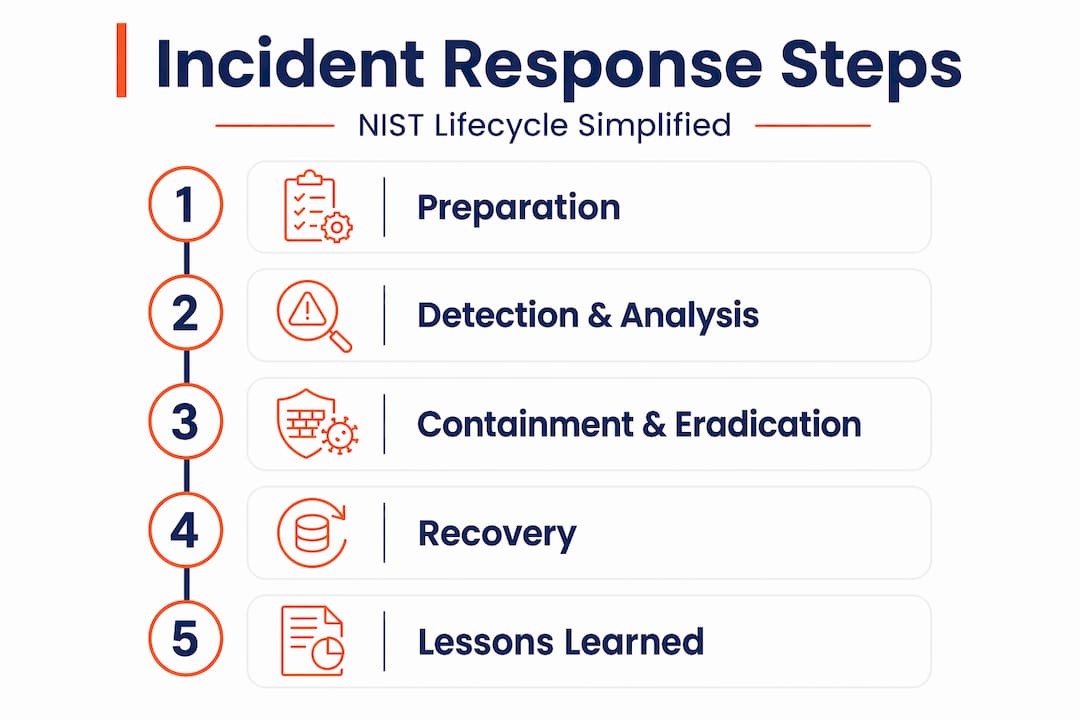
For Australian SMBs, the Preparation phase is the most important and the most overlooked. That is where you define roles, build contact lists, set up monitoring tools, and document your procedures. If you skip this, every other phase becomes improvised and slower.
There are also real legal considerations here. Under the Australian Privacy Act and the Notifiable Data Breaches scheme, businesses handling personal information must notify the Office of the Australian Information Commissioner and affected individuals if a data breach is likely to cause serious harm. Depending on your sector, healthcare and financial services in particular, there may be additional obligations. The parallel trajectory overseas is instructive: new regulatory requirements now mandate written incident response programs for smaller financial firms in the US, and Australia is trending in the same direction. Getting your incident response plan right is not just about recovery. It is about compliance.
Key reasons every SMB needs a cyber incident response plan:
- Limits financial and reputational damage by speeding up containment
- Provides a clear legal paper trail during breach notification processes
- Reduces recovery time by having predefined steps rather than improvised decisions
- Gives staff confidence and clarity during a high-stress event
- Satisfies requirements from cyber insurance policies, which often mandate a documented plan
Building the core components of your plan
Most generic templates give you a loose structure and call it done. What actually works is specificity. Your plan needs to name real people, real tools, and real escalation paths.
Assigning roles and contacts
Every incident response plan needs a named Incident Response Coordinator. This is the person who makes the call on escalation, coordinates communications, and keeps a log of decisions. It does not need to be your most technical person. It needs to be someone with authority and availability.

Effective plans include an incident handler communications plan, a defined “war room” space or equivalent, and access to encrypted communication tools. If your email server is compromised, you cannot coordinate via email. A separate secure channel, such as a Signal group or a Microsoft Teams tenant with MFA, needs to be pre-established.
Your contact list should cover:
- Internal: Incident Response Coordinator, IT lead, senior management, legal counsel
- External: Your managed IT provider, cyber insurance broker, legal advisers
- Authorities: Australian Cyber Security Centre (ACSC) on 1300 CYBER1, and AFP for serious crimes
Severity classifications and escalation paths
Not every incident warrants a full mobilisation. Define severity levels, such as low, medium, and high, with clear criteria for each. A single suspicious login attempt is not the same as active ransomware spreading across file shares. Defining activation criteria early prevents wasted time on false positives and avoids late containment when a real threat is spreading.
Tools and documentation
Your plan should list the specific tools your team will use during an incident. That includes your endpoint detection and response (EDR) platform, SIEM logs, backup console access, and any forensic evidence collection tools. Pre-assign access credentials and verify they work before an incident occurs. We see this a lot: businesses discover during an incident that a key tool requires administrator access that only one person had and they are on leave.
Pro Tip: Store a printed copy of your incident response plan, your contact list, and your severity criteria in a physical folder accessible to two or more people. This sounds old-fashioned, but it is the only option that survives a ransomware event that locks every digital system.
The step-by-step incident response process
When an incident is confirmed, the clock is ticking. The first 30 to 60 minutes are dominated by communication constraints and evidence-handling decisions. Here is how a structured cyber security incident response process should run.
-
Detect and validate. Your monitoring tools or a staff report will flag something unusual. Validate whether it is a real incident or a false positive. Mapping common attack vectors such as phishing emails, brute force attempts, and malware downloads against your alerting sources like SIEM logs or EDR alerts makes this step faster. Do not skip validation. Acting on a false positive wastes resources and creates alert fatigue.
-
Notify and activate. Once confirmed, the Incident Response Coordinator notifies the core team using the pre-established secure channel. Log the time of detection and the trigger. This timestamp matters for legal reporting and insurance claims.
-
Short-term containment. Isolate the affected system or account immediately without powering it off. Pulling a machine off the network preserves evidence while stopping lateral movement. For a compromised account, disable it and revoke active sessions. Speed matters here. Delays allow attackers to move deeper into your environment.
-
Long-term containment. Once the immediate threat is isolated, assess the scope. Which systems were accessed? How long was the attacker present? Your IT provider or internal team should be reviewing logs during this phase. Do not restore from backups yet.
-
Eradication. Remove the root cause. This might mean patching a vulnerability, removing malware, revoking compromised credentials, or rebuilding a system from a known-clean image. Recovering prematurely before fully eradicating the threat is one of the most common mistakes NIST identifies in post-incident reviews. Many businesses have been re-infected within days because they rushed this step.
-
Staged recovery. Restore systems in priority order. Monitor closely for re-entry attempts in the first 48 to 72 hours. Business-critical systems come back first, but every restored system should be verified clean before users reconnect.
-
Document and communicate. Throughout every step, log what was done, by whom, and when. This is your evidence trail. For post-incident notifications to regulators or customers, you will need this record.
Pro Tip: Brief your leadership team before an incident, not during one. Decision authority during a crisis should already be agreed upon. Who has the authority to take systems offline? Who approves a ransom payment decision? Pre-deciding this saves critical minutes.
Common pitfalls we see in practice
Honestly, the plan is rarely the problem. Execution is. Here are the mistakes we see most often with Brisbane SMBs, drawn directly from real incidents.
SMB incident response gaps most frequently include: no documented plan at all, a plan that has never been tested, a plan stored only on the systems that are now encrypted, and no awareness of legal breach notification requirements.
We would add a few more from what we see:
- Outdated contact lists. The IT person listed left the company eight months ago. The phone number rings out.
- Overreliance on tools. A business has a fancy EDR platform but no one knows how to read the alerts. Tools do not respond to incidents. People do.
- No decision authority. During a live incident, three people are arguing about whether to shut down the server. Meanwhile, the attacker has another 20 minutes to move.
- Skipping post-incident reviews. Fatigue after an incident causes teams to skip the lessons-learned meeting. This is exactly how the same mistake happens again six months later.
“An incident response plan that lives in a drawer and has never been read aloud by your team is not a plan. It is a document. The difference matters enormously the moment something goes wrong.”
Consider the experience of a small professional services firm that found out about a business email compromise by noticing unusual invoices to clients. They had no incident response plan. It took three days to work out the scope, another day to notify clients, and the reputational damage from delayed communication far exceeded the financial loss. A tabletop exercise run beforehand would have identified the gaps before the real event did.
Keeping your plan current
A plan written once and never reviewed is worse than no plan. It creates false confidence.
- Schedule a review every six months. Staff turnover, new software, and infrastructure changes all affect your plan’s accuracy. Put it in the calendar as a fixed date.
- Run a tabletop exercise at least annually. Tabletop exercises are recommended as the minimum testing frequency. Walk your team through a simulated ransomware scenario. See where the confusion is. Fix it before it matters.
- Capture lessons from real incidents. Even minor events like a phishing email that was clicked should be reviewed. What did you learn? What would you do differently? Update the plan accordingly.
- Track key metrics. Mean time to detect (MTTD) and mean time to contain (MTTC) are the two most useful numbers to monitor. If they are trending upward, something in your environment or your process has changed and needs attention.
- Stay across evolving threats. The ACSC publishes regular threat advisories. Subscribe to them. If a new ransomware variant is targeting your sector, your plan should reflect how to handle it.
Incident response plans are foundational documents that must be living, tested, and practised. Treating them as a compliance checkbox is how businesses end up chaotic when a real attack hits.
My take after working with Australian SMBs
I have been through real incidents with clients, not simulated ones. And what surprises people every time is how quickly the chaos sets in. Even technically capable teams freeze when there is no pre-agreed authority on who makes the call.
What I have found is that the best plans are not the longest ones. They are the ones with a single page of critical actions that any staff member can follow without needing IT expertise. The detailed technical runbooks live behind that. But the front page is for humans under pressure.
I also see a persistent disconnect between what is written in a plan and what is actually executable. A plan that says “isolate the affected system” means nothing if the person reading it does not know how to do that, or does not have the credentials to access the firewall. Cross-functional coordination and pre-defined decision authority are what separate plans that work from plans that read well on paper.
Honestly, most businesses skip the tabletop exercise because it feels like an unnecessary meeting. Until they have a real incident. After that, I have never had a client argue against running one again. The exercise always surfaces something critical that the written plan missed. Always.
My recommendation: spend less time making your plan document look polished and more time making it something your team has actually practised. An imperfect plan that is practised beats a perfect document that is untouched.
— Matt
How IT Start helps Brisbane SMBs with incident response
If you are not sure where to start, or you have a plan that has never been tested, IT Start works with Queensland SMBs to build practical, executable cyber security response plans tailored to your business size and risk profile. We have seen what happens when there is no plan and what it costs. Our cyber security services cover the full lifecycle, from preparation and monitoring through to containment support and post-incident review. We also offer tabletop exercises as part of our managed security work, so your team is not encountering these decisions for the first time during an actual attack. If you want to understand where your current gaps are, reach out via IT Start’s contact page to book a no-obligation assessment. Building a response plan for your Queensland business is one of the highest-value things you can do for your operational resilience this year.
FAQ
What is a cyber incident response plan?
A cyber incident response plan is a documented set of procedures that guides your business through detecting, containing, and recovering from a cyber security incident. It defines roles, escalation paths, communication steps, and legal obligations so your team can respond quickly without improvising under pressure.
How often should we test our incident response plan?
At minimum, run a tabletop exercise once a year and review the written plan every six months. After any real incident, update the plan to reflect what you learned.
What are the four phases of incident response?
The NIST incident response lifecycle covers four phases: Preparation; Detection and Analysis; Containment, Eradication, and Recovery; and Post-Incident Activity. Each phase feeds into the next in a continuous cycle.
Do Australian SMBs have legal obligations during a cyber incident?
Yes. Under the Notifiable Data Breaches scheme in the Privacy Act 1988, Australian businesses must notify the OAIC and affected individuals if a data breach is likely to cause serious harm. Some sectors such as health and finance have additional requirements.
What is the biggest mistake SMBs make with incident response plans?
The most common mistake is having a plan that has never been tested. Untested plans fall apart under the stress of a real incident because the gaps only become visible when the situation is live.