
Cyber attacks fall into a handful of repeat offenders: phishing, ransomware, malware, DDoS, SQL injection, man in the middle, supply chain compromise, business email compromise and insider threats. If you want the recognisable names attached to those categories, think SolarWinds, Kaseya, the Microsoft Exchange ProxyLogon mess, WannaCry, NotPetya and Colonial Pipeline. Every one of those started small. A single stolen password, an unpatched server, a trusted software update turned into a Trojan horse.
We manage security for SMBs across a range of industries, and honestly, the businesses that get hit hardest are rarely the ones targeted specifically. Most of the incidents we clean up are opportunistic. Someone left MFA off. A backup was sitting on the same network as everything else. Nobody checked that “IT” email asking to update banking details.
Here’s the quick list, because you probably want it before you read the detail:
- Phishing – fake emails or texts tricking someone into handing over credentials or clicking a bad link.
- Ransomware – attackers encrypt your files (and often steal them too) and demand payment.
- Malware – general term for malicious software, including Trojans, spyware and info stealers.
- DDoS – flooding a system with traffic until it falls over.
- SQL injection – exploiting a poorly coded website or database to extract or manipulate data.
- Man in the middle (MITM) – intercepting communication between two parties without them knowing.
- Supply chain attacks – compromising a trusted vendor to reach their customers, like SolarWinds and Kaseya.
- Business email compromise (BEC) – impersonating a trusted contact to redirect payments.
- Insider threats – malicious or careless actions from someone with legitimate access.
We’ll walk through each one, then get into the real incidents that made headlines and what we’ve seen go wrong on the ground.
Key takeaways
Most cyber attacks succeed because of missing basics, not sophisticated attackers, and MFA, offline backups and fast patching together stop the majority of real-world incidents.
| Point | Details |
|---|---|
| MFA is non-negotiable | Enable phishing-resistant multi-factor authentication on email, remote access and financial systems first. |
| Verify backups, don’t assume them | Confirm backups are genuinely offline or immutable, not just accessible from a domain admin account. |
| Patch on a schedule | Apply critical patches within days, not months, since WannaCry and Exchange ProxyLogon both exploited known, patchable flaws. |
| Verify payment changes by phone | Never action a bank detail change based on email alone, following the pattern behind repeated BEC losses. |
| Get help before you’re mid-crisis | IT Start’s cyber security team can assess your gaps before an attacker finds them for you. |
If your business hasn’t tested a backup restore in the last twelve months, or you’re not sure who has domain admin access right now, those are the two questions worth answering this week. IT Start works with Brisbane based SMBs to run proper assessments through our cyber security services, and if resilient hosting or backup infrastructure is part of what you need sorted, our cloud services team handles that too.
Table of Contents
- What is a cyber attack and how does it differ from a threat?
- Common cyber attack types and how they actually play out
- What major incidents actually teach us about failure points
- How attackers commonly get in
- The priority checklist that actually stops most attacks
- What to do the moment you suspect an attack
- What we actually do when a client calls after an attack
- Sources
- FAQ
What is a cyber attack and how does it differ from a threat?
A cyber attack is an actual action taken by someone to exploit a weakness in your systems. A cyber threat is the potential for that to happen. The distinction matters more than people think, because a lot of small business owners hear “threat” and “attack” used interchangeably and it muddies how they prioritise risk.
The ASD/ACSC, the US CISA, and NIST all frame it the same way: a threat is a source or circumstance with the potential to cause harm, an attack is the exploitation of that potential. An unpatched Exchange server sitting exposed to the internet is a threat. Someone actually using the ProxyLogon flaw to drop a web shell on that server and steal mailbox data is an attack.
A vulnerability existing in your software is not an incident. It becomes one the moment someone uses it against you, which is exactly what happened with Exchange ProxyLogon in 2021 when threat actors moved from “this flaw exists” to “we’re inside thousands of servers” within days of disclosure.
We see business owners get this backwards constantly. They’ll tell us “we haven’t been attacked” when what they mean is “we haven’t noticed anything yet.” Those are two very different sentences.
Common cyber attack types and how they actually play out
This is the meat of it. Every category below includes how it works, a real example, warning signs, and one thing you can do about it right now, not next quarter.
Phishing and spearphishing
Phishing is still the front door for most attacks we investigate. An email looks like it’s from your bank, your CEO, or a supplier, and it asks you to click, log in, or reply with sensitive information. Spearphishing is the targeted version, built around research on a specific person, often pulled straight off LinkedIn.
Real example: Business email compromise scams routed through fake supplier emails have cost Australian companies hundreds of thousands of dollars in single incidents. One documented case saw a business lose $190,000 after a supplier’s email account was hacked and used to send altered bank details for an invoice payment.
Quick indicators:
- Urgency in the tone (“pay this today or the account gets suspended”)
- A slightly wrong domain name or reply-to address
- A request to change payment details via email alone
Immediate mitigation: turn on phishing-resistant MFA everywhere, no exceptions for “just this one legacy system.”
Ransomware and double extortion
Ransomware encrypts your files, then demands payment to unlock them. The modern version, double extortion, adds a second threat: pay up or we publish your stolen data. This shift happened because businesses got better at restoring from backup, so attackers needed new leverage.

Real example: WannaCry in 2017 hit hundreds of thousands of machines across 150 countries in a matter of hours, exploiting a Windows SMB flaw that had a patch available weeks before the attack. NotPetya followed soon after, disguised as ransomware but built for pure destruction, and it caused billions in damage globally, including grinding shipping giant Maersk to a halt for days.
Indicators to watch for:
- File extensions suddenly changing
- Ransom notes appearing on desktops or shared drives
- Backup jobs failing without explanation right before an incident
Immediate mitigation: get a copy of your backups genuinely offline or immutable, not just “in the cloud.” More on why that distinction matters later.
Our related piece on ransomware examples SMBs actually face goes deeper into recovery timelines if you want the detail.
Malware, Trojans and info stealers
Malware is the umbrella term. Trojans disguise themselves as legitimate software. Info stealers quietly harvest saved passwords, browser cookies and session tokens, then ship that data to the attacker without you noticing anything running.
Real example: Info stealer logs have become a commodity traded on criminal forums, often the initial entry point for bigger attacks including ransomware deployment, because a stolen session token can bypass MFA entirely.
Indicators:
- Unexpected new browser extensions
- Antivirus alerts you’ve been ignoring
- Slower machine performance with unfamiliar background processes
Immediate mitigation: deploy endpoint detection and response (EDR), not just traditional antivirus. Traditional AV misses too much of this now.
Denial of service and distributed denial of service (DoS/DDoS)
A DoS attack floods a system with traffic or requests until it can’t respond to legitimate users. DDoS does the same thing using a distributed network of compromised devices, making it harder to block.
Real example: DDoS attacks against critical infrastructure and healthcare have increased, according to the ACSC’s Annual Cyber Threat Report, which flags rising volumes against sectors that can least afford downtime.
Indicators:
- Website or service suddenly unreachable
- Unusual spikes in traffic from unfamiliar geographic regions
- Support tickets flooding in about “the site is down”
Immediate mitigation: use a content delivery network or DDoS protection service in front of anything public-facing.
SQL injection
This targets poorly coded websites or applications that don’t properly sanitise user input. An attacker types malicious code into a form field, and if the backend database isn’t protected, that code executes and can extract or manipulate data.
Real example: SQL injection has been behind some of the largest historical data breaches, including attacks against retail and government databases where attackers pulled customer records straight out of unprotected fields.
Indicators:
- Unusual database query logs
- Error messages revealing database structure to users
- Unexpected data exports or admin account creation
Immediate mitigation: if you run a custom web app, get it penetration tested. Off-the-shelf platforms need their plugins patched constantly too.
Man in the middle (MITM)
An attacker sits between two parties in a conversation, whether that’s a browser and a website or two people on the same public Wi Fi, and intercepts or alters the data passing through.
Real example: Public Wi Fi in cafes and airports remains a common hunting ground for MITM attacks, particularly against staff logging into company systems without a VPN while travelling.
Indicators:
- Certificate warnings in the browser
- Unexpected login prompts on trusted sites
- Sessions logging out repeatedly for no reason
Immediate mitigation: enforce VPN use for remote work and disable auto-connect to open Wi Fi networks on company devices.
Supply chain attacks
This is where a trusted vendor becomes the attack vector. Instead of breaking into your business directly, the attacker compromises software or a service you already trust, then rides that trust straight into your environment.
Real example: SolarWinds is the textbook case. Attackers compromised the build process for the Orion network monitoring software and pushed a malicious update to roughly 18,000 customers, including US government agencies. It went undetected for months because the update came from a legitimate, signed source.
Kaseya followed a similar pattern in 2021, but with ransomware as the payload. Attackers exploited a vulnerability in Kaseya’s VSA remote monitoring tool, used by managed service providers, and pushed ransomware down to an estimated 1,500 downstream businesses in one campaign. That one hit close to home for anyone in the MSP world, because it proved the tools we use to protect clients can themselves become the weak point if a vendor’s own security lapses.
Indicators:
- Unexpected software updates outside your normal patch schedule
- New unfamiliar processes running after a vendor update
- Vendor communication about a breach on their end
Immediate mitigation: ask your vendors what their own security posture looks like, and don’t assume “it’s a big company” means “it’s secure.”
Business email compromise (BEC)
BEC is a specific, financially devastating flavour of phishing where attackers impersonate an executive, supplier or finance contact to redirect payments. No malware required most of the time. Just a convincing email and a sense of urgency.
Real example: The AFP has reported BEC incidents costing a conveyancing firm $338,000 and a construction company $41,800 in separate incidents, showing this isn’t limited to any one industry.
Indicators:
- Sudden change to bank account details in an email
- Requests to bypass usual approval processes
- Emails sent outside normal business hours from a “known” contact
Immediate mitigation: verify any payment detail change with a phone call to a known number, never a number provided in the email itself.
Insider threats
Not every attack comes from outside. Insider threats range from a disgruntled employee deliberately leaking data to a well-meaning staff member clicking the wrong link because nobody trained them on what to look for.
Real example: Departing employees retaining access to cloud accounts or shared drives after their last day is one of the most common insider risks we see in practice, often because offboarding isn’t tied into IT processes properly.
Indicators:
- Access to systems continuing after termination
- Unusual data downloads before someone resigns
- Shared credentials nobody can account for
Immediate mitigation: tie offboarding directly to your IT provider’s checklist, same day, no exceptions.
Pro Tip: If your business has more than one person with domain admin rights and you can’t name all of them off the top of your head, that’s already a gap worth fixing before you worry about anything more exotic.
What major incidents actually teach us about failure points
Reading about SolarWinds or Colonial Pipeline in the news is one thing. Understanding exactly where the door was left open is more useful, because the same failure points show up in small business breaches constantly, just at a smaller scale.
SolarWinds (2020) happened because attackers compromised the software build pipeline itself, not a user’s inbox. The lesson for SMBs isn’t “audit your build pipeline,” most of you don’t have one. It’s “understand that trusting a vendor blindly is itself a risk decision, and you should know what access that vendor has into your environment.”
Kaseya (2021) exploited an unpatched vulnerability in remote monitoring software used by MSPs, then pushed ransomware downstream to end customers. The failure point was a zero-day in vendor software combined with broad trust relationships between MSPs and their clients. It’s a sharp reminder that even businesses doing “the right thing” by outsourcing IT can be exposed if their provider’s own tooling has a flaw.
Microsoft Exchange ProxyLogon (2021) was a set of vulnerabilities in on-premises Exchange servers that let attackers read email and drop web shells for persistent access, before Microsoft even released a patch. Tens of thousands of organisations globally were compromised in the window between disclosure and patching. We still find businesses running old on-premises Exchange today, years later, simply because migrating to cloud email got put in the “later” pile.
WannaCry and NotPetya (2017) both spread using the EternalBlue exploit against unpatched Windows SMB. WannaCry was opportunistic ransomware. NotPetya was disguised as ransomware but built to destroy, and it caused an estimated several billion dollars in global damage. The patch for the underlying vulnerability had been available for months before either attack. That’s the part that should sting. This wasn’t a zero-day. It was a known fix that too many organisations hadn’t applied.
Colonial Pipeline (2021) shut down fuel supply across the US east coast after ransomware hit the company’s billing systems, not even the operational technology directly. The initial access reportedly came through a single compromised VPN account that didn’t have MFA enabled and was tied to a password that had been reused elsewhere.
Here’s what we see constantly with clients, and it maps almost exactly to those patterns:
- No MFA on remote access, exactly like Colonial Pipeline.
- Backups connected to the same network as production systems, meaning ransomware encrypts the backup along with everything else.
- Email account compromises that go unnoticed for weeks because nobody’s monitoring sign-in logs.
When a client calls after something’s gone wrong, the checklist we run is almost always the same: isolate the affected device from the network immediately, check whether backups are actually intact and offline, reset every credential that touched the compromised system, and only then start rebuilding.
| Incident | Initial access vector | Most useful immediate control |
|---|---|---|
| SolarWinds | Compromised software build pipeline | Vendor risk assessment and network segmentation |
| Kaseya | Zero-day in vendor remote monitoring tool | Limiting third-party remote access scope |
| Exchange ProxyLogon | Unpatched public-facing mail server | Rapid patching cadence and reducing on-premises exposure |
| WannaCry/NotPetya | Unpatched SMB vulnerability (EternalBlue) | Timely patch management |
| Colonial Pipeline | Single compromised VPN account, no MFA | Multi-factor authentication on all remote access |
The ACSC’s advisory on tactics, techniques and procedures used against Australian networks confirms this pattern isn’t unique to headline incidents. Exploitation of public-facing applications and credential theft show up repeatedly in real intrusions here too.
How attackers commonly get in
Strip away the branding around any famous breach and the entry points repeat themselves constantly. The ACSC’s own TTP summary names them plainly: exploitation of public-facing applications, valid account abuse (stolen or reused credentials), web shells for persistence, and brute force attempts against exposed services.
Credential theft deserves particular attention because it’s so often invisible until it’s too late. Someone reuses a password across a personal account and a work account. The personal account gets breached in some unrelated incident, the credentials get sold or dumped online, and months later an attacker tries that same password against your Microsoft 365 login. If MFA isn’t enabled, that’s the whole attack. No malware, no exploit code, just a password that already existed somewhere else.
Detecting this stuff is genuinely hard for small businesses because most don’t have centralised logging or anyone watching it in real time. Here’s a compact table of what to look for and where.
| Indicator | Where to look | What it might mean |
|---|---|---|
| Login from unfamiliar country | Microsoft 365 sign-in logs | Credential compromise or account takeover |
| Unexpected scheduled tasks | Windows Task Scheduler on servers | Persistence mechanism from malware |
| New or unfamiliar files in web root | Website hosting file structure | Web shell planted after exploitation |
| Sudden outbound traffic spike | Firewall or router logs | Data exfiltration in progress |
| Compressed archive files appearing | File servers or shared drives | Attacker staging data before theft |
If you’re running a business with 10 to 50 staff and none of this is being actively monitored, you’re not unusual. Most SMBs we onboard have zero centralised logging when we start. The minimum starting point is enabling sign-in logs in Microsoft 365 and turning on alerts for impossible travel or multiple failed logins. It costs nothing extra if you’re already on a Business Premium licence.
The priority checklist that actually stops most attacks
If you only do five things this year, do these in this order: multi-factor authentication everywhere, a genuine patching schedule, offline or immutable backups, endpoint detection on every device, and out-of-band verification for any payment change. That combination stops the overwhelming majority of incidents we see land on a client’s desk.
Here’s the implementation order we’d actually run with a new client:
- Turn on MFA for every account, especially email, remote access and anything holding financial data. Prioritise phishing-resistant methods where possible, not just SMS codes.
- Patch operating systems and applications on a set schedule, not “whenever someone remembers.” Critical patches within 48 hours where feasible, per the pattern seen in WannaCry and ProxyLogon.
- Get backups genuinely offline or immutable. Cloud backup that a domain admin account can write to or delete isn’t a real backup, it’s a second copy sitting next to the first one.
- Deploy EDR on every endpoint, not just servers. Laptops and workstations are usually where the initial compromise happens.
- Set out-of-band verification as policy for any change to banking details, no exceptions for “the CEO said it was urgent.”
- Enable email authentication (SPF, DKIM, DMARC) to reduce the chance your domain gets spoofed in someone else’s phishing campaign.
The ASD/ACSC’s Essential Eight is the baseline most Australian frameworks point back to, and for SMBs the elements that matter most, honestly, are application patching, MFA, and restricting admin privileges. The other elements matter too, but those three catch the bulk of what actually walks through the door.
For a broader run through of how to think about prioritisation, our guide on identifying and ranking cyber risk is worth reading alongside this checklist. Total Cyber Solutions also has a solid practical breakdown of implementing phishing-resistant MFA if you want a vendor-neutral technical walkthrough.
Pro Tip: We regularly find backups that are technically “offsite” but still writable by the same domain admin account that runs the rest of the network. If ransomware compromises that account, it can reach in and delete or encrypt the backup too. Ask your provider specifically whether your backup credentials are separate from your domain admin credentials. If the answer is vague, that’s your answer.
What to do the moment you suspect an attack
Speed matters here, but so does not making things worse. The first hour after discovering something’s wrong sets the tone for how bad the recovery is.
- Isolate affected systems immediately. Pull the network cable or disable Wi Fi on the affected machine rather than shutting it down, since a clean shutdown can sometimes destroy evidence needed for investigation.
- Preserve evidence before you start cleaning anything up. Screenshots, logs, and the ransom note if there is one.
- Change credentials from a separate, uncompromised device. Never reset passwords from the machine you suspect is compromised.
- Activate your backup and restore plan, assuming you’ve verified it’s genuinely intact and untouched.
- Contact your MSP or IT provider straight away, and report to authorities where applicable. In Australia that’s cyber.gov.au for reporting and guidance.
One short paragraph on what not to do, because it matters as much as the action list: don’t pay a ransom before getting advice, and don’t reboot affected systems until someone competent tells you it’s safe, since a reboot can trigger further encryption or wipe volatile memory that investigators need. Our detailed runbook on what to do during a cyber attack walks through this in more depth, and our guide to reporting a cyber incident in Australia covers exactly who to call and when.
What we actually do when a client calls after an attack
The call usually comes in one of two tones. Either someone’s calm and says “something looks weird,” or someone’s panicking because a ransom note is on every screen in the office. Both get the same triage sequence, just at different speeds.
First thing we do is isolate. Pull the affected devices off the network, keep them powered on if it’s safe to do so, and stop the bleeding before we do anything else. Then we take a forensic snapshot, essentially a copy of the state of things before we touch anything further, because you want to understand how they got in, not just kick them out and hope it doesn’t happen again.
Credential resets come next, run from a device we know is clean. Then we make the call on rebuild versus restore. If backups are solid, a staged restore from a known good point is almost always faster and safer than trying to clean an infected system. If backups are compromised too, and honestly this happens more than it should, we’re looking at rebuilding from scratch, which is slower, more expensive, and exactly why the backup conversation matters so much before anything goes wrong.
The biggest surprise for most clients, every single time, is discovering their backups weren’t actually protecting them. We’ve seen it enough times that it stopped being surprising to us years ago. A business assumes because there’s a backup job running nightly that they’re covered. Nobody checked whether that backup was accessible from the same domain credentials that got compromised. Legally too, there’s a sting in the tail here. Even where a business has clearly been the victim of an invoice interception scam, courts have in some cases still held the payer liable for the debt, because relying on an email alone to verify bank details wasn’t considered reasonable care.
One client, a professional services firm with around 20 staff, had a finance team member act on an email requesting updated bank details for a regular supplier payment. No phone call to verify. The transfer went out before anyone realised the email domain was one character off from the real one. We can’t recover funds already sent, that’s a bank and law enforcement matter, but the fix going forward was simple: mandatory phone verification for any banking detail change, no exceptions, documented in writing so everyone in finance knows the rule exists.
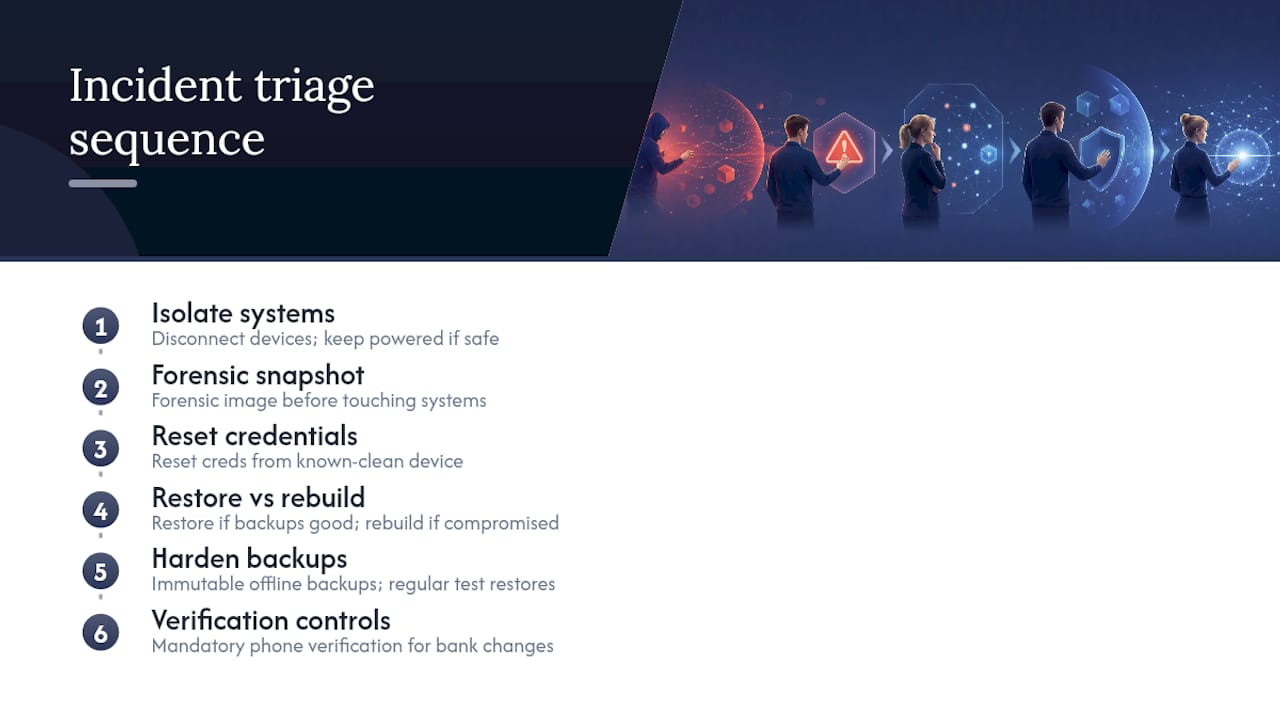
Another client had backups running for years, dutifully, every night, and never once tested a restore. When ransomware hit, the backup software itself had been compromised weeks earlier and was quietly backing up already encrypted files. The fix wasn’t complicated technically, immutable, offline backups with regular test restores, but it required the client to stop assuming “it’s running” means “it’s working.”
Sources
- Cyber
- Business email compromise: our business lost $190 000 when our supplier’s email was hacked | Scamwatch
- Criminals target construction sector with business email compromise scams — AFP media release
- Microsoft Digital Defence Report: 600 million cyberattacks per day around the globe
FAQ
What are the top cyber attacks businesses face?
Phishing, ransomware, business email compromise, malware and supply chain attacks account for the bulk of incidents businesses report, with credential theft as the common thread linking most of them.
What are the most common types of cyber attacks?
Beyond the top five, DDoS, SQL injection, man in the middle attacks and insider threats round out the list of attack types businesses encounter most often, each with distinct warning signs covered above.
Is there a major cyber attack happening right now?
Large scale attacks happen continuously rather than as isolated events. Microsoft’s Digital Defence Report describes roughly 600 million cyberattacks occurring daily worldwide, meaning some incident is almost certainly unfolding somewhere as you read this.
What is the most famous cyber attack in history?
WannaCry in 2017 is often cited as the most widely recognised due to its speed and scale, spreading to hundreds of thousands of machines across 150 countries in days, though SolarWinds is arguably more significant for how it changed thinking about supply chain risk.
What is the biggest cyber security threat right now?
Business email compromise and ransomware currently cause the most direct financial damage to small and medium businesses, with the ACSC’s threat reporting flagging both as leading disruptive threats against Australian organisations.