TL;DR:
- IT support engineers keep businesses running by resolving issues, maintaining systems, and protecting data. They also handle cybersecurity tasks like patching, MFA enforcement, and managing backups to reduce risks. While larger teams benefit from internal support, most SMBs under 50 prefer managed services for broader expertise and cost savings.
An IT support engineer is the person responsible for keeping your business technology running, resolving faults, managing systems, and protecting your data from threats. For small to medium-sized businesses in Brisbane, understanding IT support engineer responsibilities is the difference between a tech function that quietly enables growth and one that quietly creates risk. The industry term for this role spans several titles, including IT support analyst, systems support engineer, and help desk engineer, but the core duties remain consistent. This guide breaks down what these engineers actually do, what skills they need, and how to decide whether you need one in-house or through a managed service.
What are the core daily responsibilities of an IT support engineer?
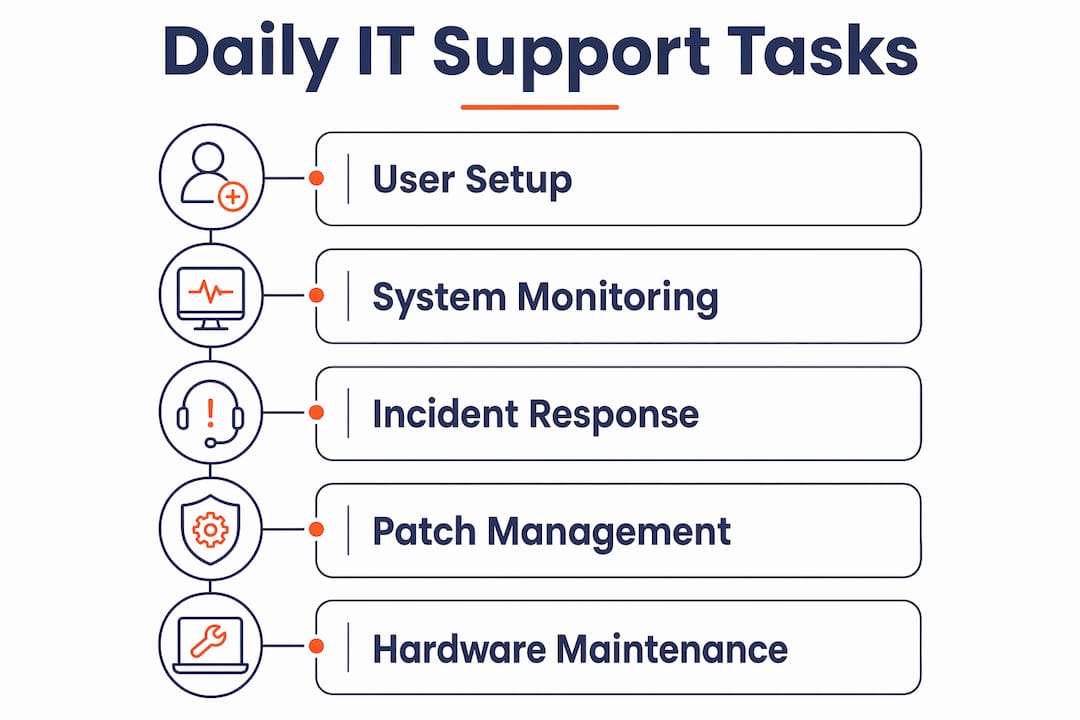
An IT support engineer’s daily work covers user support, system maintenance, incident management, and hardware oversight. These tasks are not glamorous, but they are the foundation of business continuity for any organisation running on technology.

The most visible part of the role is user support. This includes setting up new staff with laptops, Microsoft 365 accounts, and network access, then resolving the inevitable issues that follow. Password resets, printer failures, and software crashes are common support requests, but so are more complex problems like VPN connectivity, email delivery failures, and cloud sync errors. Documented SLAs and tiered escalation improve resolution times and user satisfaction in SMB environments. That matters because unresolved tickets stack up fast when there is no clear process.
System monitoring and maintenance are equally important IT engineer tasks. A good support engineer checks server health, reviews backup logs, applies software patches, and monitors network performance, ideally before users notice a problem. Reactive support is expensive. Proactive maintenance is not.
Common daily responsibilities include:
- Onboarding and offboarding staff accounts in Microsoft 365 and Active Directory
- Triaging and resolving help desk tickets within agreed response windows
- Applying operating system and application patches on a regular schedule
- Monitoring backup jobs and verifying restore capability
- Maintaining hardware inventory and flagging ageing equipment
Pro Tip: Ask your IT support engineer to show you the backup restore log at least once a quarter. Many businesses think they are backed up when they are not. A log that shows successful backups means nothing if no one has tested a restore.
Leading providers target under 15 minutes for critical issue response and same-day resolution for most tickets. That benchmark gives you a practical standard when evaluating whether your current support is performing.
How do IT support engineers contribute to cybersecurity and risk management?
Cybersecurity is now a core part of the IT technical support engineer job description, not an optional extra. The threat environment has changed, and so has the expectation placed on support engineers.
The Australian Cyber Security Centre’s Essential Eight maturity model sets the benchmark for SMB security controls. An IT support engineer working to this standard handles patching, multi-factor authentication (MFA) enforcement, application control, and regular access reviews. These are not one-off projects. They are ongoing maintenance tasks that require discipline and documentation. Cyber insurance now expects Essential Eight alignment, MFA, incident response plans, and verified backups. A single internal IT generalist rarely meets all of these requirements alone.
The gap between what businesses expect and what one person can deliver is real. We see this constantly. A sole internal IT person is managing help desk tickets, setting up new staff, keeping the network running, and is now also expected to own the security posture. Something always gets deprioritised, and it is usually security.
Key cybersecurity tasks that fall within IT support duties include:
- Enforcing MFA across Microsoft 365 and other business applications
- Applying security patches within the timeframes required by Essential Eight
- Reviewing and restricting user access permissions
- Configuring and monitoring endpoint protection software
- Maintaining an incident response plan and testing it annually
IT support viewed as risk management is the right frame for businesses with 15 or more staff. Treating IT as a cost centre leads to underinvestment in exactly the controls that prevent expensive incidents.
What skills and technical areas must IT support engineers master?
The IT support engineer job description for an SMB environment is broader than most managers expect. This is not a role where someone fixes computers. It is a role that spans networking, cloud platforms, security, hardware, and documentation.
The technical areas a capable support engineer must cover include:
- Microsoft 365 administration including Exchange Online, Teams, SharePoint, and Intune device management
- Networking fundamentals covering DNS, DHCP, VLANs, firewalls, and VPN configuration
- Endpoint management for Windows and macOS devices, including imaging and patch management
- Backup and disaster recovery using tools that provide verified, offsite, and tested restores
- Security basics aligned to the Essential Eight, including MFA, patching, and access control
Beyond technical skills, documentation is the capability most often missing. When an engineer leaves and takes all the environment knowledge with them, the business is exposed. A well-documented environment, covering network diagrams, software licences, vendor contacts, and configuration notes, is a direct business asset.
Staff tenure strongly predicts service quality and consistency. An engineer who has worked in your environment for two years knows where the problems are before they surface. That institutional knowledge is hard to replace and worth protecting.
Pro Tip: Require your IT support engineer to maintain a living document covering your network layout, key vendor contacts, and any non-standard configurations. If they left tomorrow, could someone else pick it up? If the answer is no, that is a risk you are carrying right now.
Cloud platform skills are increasingly non-negotiable. Most Brisbane SMBs run Microsoft 365, and the cloud services layer now includes identity management, device policies, and data governance. An engineer who only knows on-premise infrastructure is already behind.
How do SMBs decide between internal IT support engineers and managed services?
This is the question Brisbane business owners ask most often, and the answer depends on your headcount, risk profile, and budget.
Internal IT hiring becomes cost-effective only beyond 75–100 staff for most Australian SMBs. Under 50 staff, outsourcing is more economical and typically delivers broader expertise. Most Australian SMBs under 50 staff fully outsource IT, and hybrid models become common between 100 and 300 staff. These are not arbitrary thresholds. They reflect the real cost of salary, benefits, training, leave cover, and the risk of a single point of failure.
Ad-hoc or block-hour IT support consistently fails to deliver proactive support or guaranteed response times. Businesses that rely on “we’ll call someone when something breaks” are not managing IT. They are gambling with uptime.
The table below compares the two main models on the factors that matter most to SMB managers.
| Factor | Internal IT support engineer | Managed IT services |
|---|---|---|
| Coverage hours | Business hours only unless overtime paid | Extended hours with on-call options |
| Breadth of skills | One person’s knowledge | Team with specialised roles |
| Continuity risk | High if engineer leaves | Low with documented handover processes |
| Cybersecurity depth | Limited for solo generalist | Dedicated security capability |
| Cost at under 50 staff | Higher total cost | Lower total cost |
| Scalability | Requires new hire to scale | Scales with service tier |
The types of IT support available for Brisbane SMBs have expanded significantly. A managed service provider brings a team, documented processes, and SLAs that a single internal hire cannot match at the same price point.
Honestly, the hybrid model is often the right answer for businesses between 50 and 150 staff. An internal IT manager handles vendor relationships and business alignment, while a managed service provider handles day-to-day support, security monitoring, and after-hours coverage. Understanding how to choose managed IT services is worth the time before you commit to either model.
When evaluating managed service providers, the tenure of their engineering staff is a reliable quality signal. Long-tenured engineering staff deliver better continuity and institutional knowledge. Ask any provider how long their average engineer has been with the business. High turnover is a warning sign, regardless of what the sales pitch says. This applies equally to offshore staffing arrangements, where staff retention and knowledge continuity are critical to avoiding service gaps.
Key takeaways
Effective IT support engineer responsibilities extend well beyond break-fix tasks to cover cybersecurity, cloud management, documentation, and proactive system maintenance.
| Point | Details |
|---|---|
| Daily duties are broad | IT support engineers handle user onboarding, patching, monitoring, and ticket resolution every day. |
| Cybersecurity is now core | Essential Eight alignment, MFA, and verified backups are standard expectations, not optional extras. |
| Documentation protects the business | A well-documented environment reduces risk when engineers change and speeds up incident response. |
| Internal IT suits larger teams | Most Brisbane SMBs under 50 staff get better value and coverage from managed services. |
| Staff tenure signals quality | Long-tenured engineers deliver better support continuity and environment knowledge than high-turnover teams. |
What I have learned managing IT support for Brisbane SMBs
Honestly, the biggest misconception I see from business owners is that IT support is just about fixing things when they break. That framing leads to underinvestment, reactive contracts, and a support function that is always behind.
The businesses that get IT support right treat it as a risk management function from day one. They have documented environments, tested backups, and a support provider with clear SLAs. The ones that get it wrong are usually running on ad-hoc arrangements, have no idea what their backup status is, and find out the hard way when something goes wrong.
The gap between expectation and reality is sharpest around cybersecurity. Business owners assume their IT person is handling security. The IT person is handling tickets and fires. Nobody is doing the Essential Eight controls because there is no time and no mandate. Cyber insurance claims get rejected because MFA was not enforced or backups were not verified. This is not a hypothetical. We see it.
My advice for Brisbane SMB managers is this: before you hire an internal IT support engineer or sign a managed service contract, get clarity on three things. First, who owns your security posture and how is it measured? Second, when did someone last test a backup restore? Third, what happens to your IT support if your engineer resigns tomorrow? If you cannot answer all three, the IT support duties conversation needs to happen before the hiring conversation.
— Matt
IT Start: managed IT support for Brisbane SMBs
IT Start provides business IT support for small to medium-sized businesses across Brisbane, covering managed IT services, Microsoft 365 administration, and cybersecurity aligned to the Essential Eight. The team holds SMB 1001 Gold certification and works with businesses in professional services, healthcare, legal, and financial services. IT Start’s approach is proactive, not reactive. That means documented environments, tested backups, and clear SLAs before an incident occurs. If your business is reviewing its IT support model or wants to understand whether your current setup meets the security standards that cyber insurers now expect, IT Start offers a free assessment. The cybersecurity services team can identify gaps and give you a clear picture of where your risk sits.
FAQ
What does an IT support engineer do day to day?
An IT support engineer handles user support requests, system monitoring, patch management, and hardware maintenance. The role also covers onboarding new staff, managing Microsoft 365 accounts, and responding to incidents within agreed timeframes.
What is the difference between a help desk engineer and an IT support engineer?
A help desk engineer typically handles first-level ticket resolution and user queries, while an IT support engineer covers a broader scope including system administration, networking, and security tasks. In SMB environments, the two roles often overlap significantly.
How many staff do you need before hiring an internal IT support engineer?
Internal IT hiring becomes cost-effective for most Australian businesses beyond 75–100 staff. Under 50 staff, a managed service provider typically delivers broader skills and better coverage at a lower total cost.
What cybersecurity tasks fall under IT support engineer responsibilities?
Core cybersecurity tasks include enforcing MFA, applying security patches to meet Essential Eight timeframes, managing endpoint protection, reviewing user access permissions, and maintaining a tested incident response plan.
How do I evaluate the quality of an IT support provider?
Ask about the average tenure of their engineering staff, their documented SLA response times, and when they last tested a client’s backup restore. Long-tenured engineers and verified backup processes are the most reliable quality indicators.