TL;DR:
- Professional IT support is a strategic, proactive service that enhances efficiency and security.
- Investing in IT reduces downtime, automates routine tasks, and supports business growth.
- Choosing a local, experienced provider ensures tailored, scalable solutions that safeguard future success.
Most Queensland business owners think IT support means someone shows up when the internet goes down. That assumption is costing them. Professional IT support is a strategic function that shapes how efficiently your business runs, how well it handles growth, and how resilient it is against cyber threats. Cyberattacks on small businesses in Australia are rising sharply, yet many small to medium-sized enterprises (SMEs) still treat IT as an afterthought. This guide breaks down what professional IT support actually does, how it drives operational efficiency, and what to look for when choosing a provider that genuinely fits your Queensland business.
Table of Contents
- What does professional IT support involve?
- The impact of IT support on operational efficiency
- Professional IT support and cybersecurity: safeguarding your business
- Choosing the right IT support partner for your Queensland business
- What most Queensland SMEs get wrong about IT support
- Get reliable IT support for your Queensland business
- Frequently asked questions
Key Takeaways
| Point | Details |
|---|---|
| Go beyond basic fixes | Professional IT support offers strategic value, not just troubleshooting. |
| Boost efficiency every day | Reliable IT services streamline business operations and save time. |
| Strengthen cyber defences | Expert IT support minimises security risks for Queensland SMEs. |
| Choose wisely | Selecting the right IT partner ensures ongoing growth and no nasty surprises. |
What does professional IT support involve?
There is a significant difference between calling someone to fix a crashed computer and having a dedicated IT support partner managing your entire technology environment. Professional IT support provides services that go well beyond basic troubleshooting. It covers system maintenance, cybersecurity, cloud infrastructure, compliance monitoring, and user help desk support, all delivered consistently and proactively.
Reactive IT support waits for something to break. Proactive IT support monitors your systems around the clock, identifies vulnerabilities before they become problems, and plans technology upgrades that align with your business goals. That shift from reactive to proactive is where the real value lies.
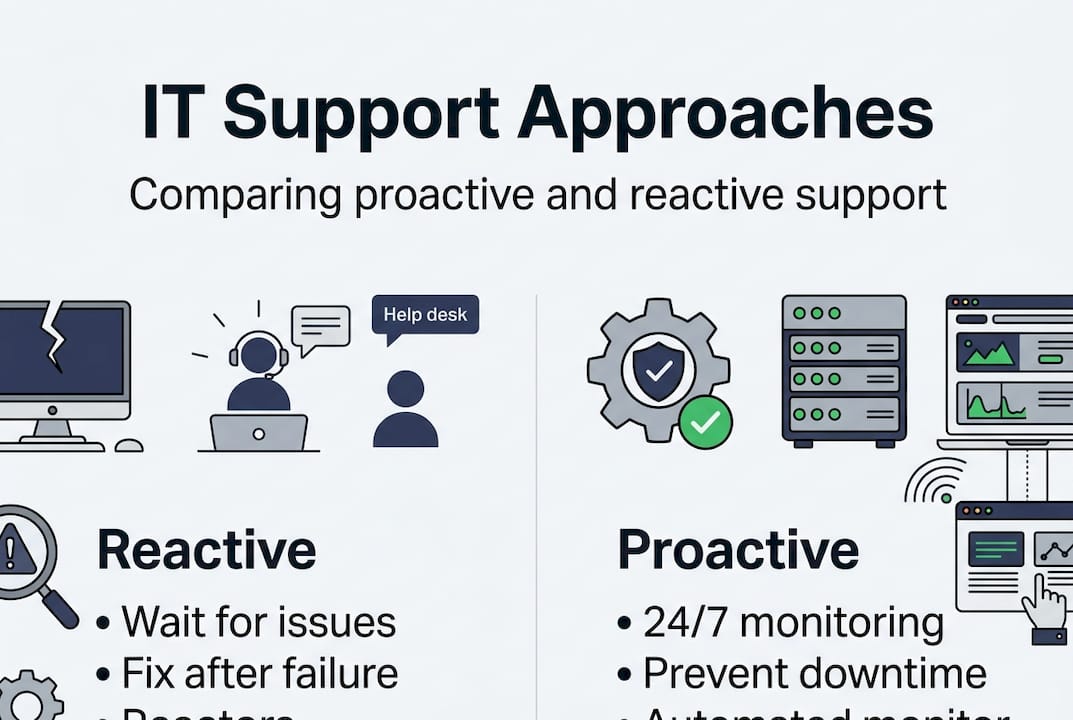
Here is a breakdown of what a professional IT support package typically covers:
| Service area | What it includes |
|---|---|
| System maintenance | Software updates, patch management, hardware monitoring |
| Cybersecurity | Threat detection, firewalls, endpoint protection, compliance |
| Cloud support | Migration, management, and optimisation of cloud platforms |
| Help desk | User support for day-to-day technical issues |
| Strategic planning | Technology roadmaps aligned with business growth |
The core IT management services a quality provider delivers are not one-size-fits-all. They adapt to the size, industry, and risk profile of your business. For a healthcare practice, compliance with data privacy laws is critical. For a legal firm, document security and access controls are paramount.
Key functions you should expect from a professional IT support provider include:
- Continuous network monitoring to catch issues before users notice them
- Regular security audits to identify gaps in your defences
- Documented processes so your team always knows how to escalate issues
- Vendor management so you are not dealing with multiple software suppliers on your own
- Technology budgeting to avoid surprise capital expenditure
The IT support for business operations landscape has matured considerably. Businesses that invest in structured support consistently outperform those relying on ad hoc fixes, both in uptime and in staff satisfaction.
The impact of IT support on operational efficiency
Every hour your team spends wrestling with a slow system or waiting for a password reset is an hour not spent on revenue-generating work. Efficient IT support reduces downtime and allows staff to focus on their actual roles rather than troubleshooting technology.
Consider a typical Brisbane SME with fifteen employees. Without managed IT support, staff might collectively lose four to six hours per week dealing with minor technical issues. Over a year, that adds up to hundreds of lost productive hours. With a proactive IT partner handling those issues in the background, those hours return to the business.
Operational efficiency gains from professional IT support include:
- Faster problem resolution through dedicated help desk support with defined response times
- Automated routine tasks such as backups, software updates, and security scans
- Streamlined onboarding for new staff with pre-configured devices and access controls
- Reduced shadow IT by giving staff reliable tools so they stop using unsanctioned workarounds
- Better collaboration through properly configured cloud platforms and communication tools
“The businesses that grow fastest are not always the ones with the best products. They are the ones whose internal systems create the least friction.”
Pro Tip: Ask your IT support provider to audit your most time-consuming manual processes. Many can be automated through existing tools you already pay for but are not fully using.
The technology for Queensland SMEs guidance from Queensland Government reinforces that investing in the right technology infrastructure is one of the highest-return decisions a small business can make. Pairing that investment with expert IT support ensures you actually get the return you are paying for. For businesses ready to move beyond reactive fixes, proactive IT efficiency is the model that delivers consistent results.

Professional IT support and cybersecurity: safeguarding your business
Cybersecurity is no longer a concern reserved for large corporations. Cyberattacks on small businesses in Australia are increasing year on year, with SMEs often targeted precisely because they lack the defences of larger organisations. A single breach can cost tens of thousands of dollars in recovery, legal fees, and reputational damage.
Professional IT support addresses this by building layered security into your everyday operations rather than treating it as a separate project. From endpoint protection to multi-factor authentication and staff training, a good IT partner reduces your attack surface systematically.
Here is how common cyber threats map to IT support responses:
| Cyber threat | IT support response |
|---|---|
| Phishing attacks | Staff awareness training, email filtering |
| Ransomware | Regular backups, endpoint detection, incident response plans |
| Unauthorised access | Multi-factor authentication, access controls, audit logs |
| Outdated software vulnerabilities | Automated patch management and update schedules |
| Data breaches | Encryption, data loss prevention tools, compliance monitoring |
To strengthen your cyber posture right now, work through this checklist with your IT provider:
- Enable multi-factor authentication across all business accounts
- Confirm that automated backups run daily and are stored offsite or in the cloud
- Review who has administrator access and remove unnecessary privileges
- Schedule quarterly security awareness training for all staff
- Test your incident response plan so your team knows what to do if a breach occurs
The cyber security advice from the Australian Cyber Security Centre is a useful starting point, but implementing those recommendations effectively requires technical expertise. That is where managed IT and support services make the difference, translating government guidance into practical, business-specific action.
Choosing the right IT support partner for your Queensland business
Not all IT support providers are equal. The right provider does not just fix problems. The right IT support provider adapts services to your business’s growth trajectory and risk profile. That requires local knowledge, industry experience, and a genuine interest in your outcomes.
When evaluating providers, look for these qualities:
- Local presence in Queensland so support is accessible and response times are realistic
- Industry-specific experience relevant to your sector, whether that is healthcare, legal, or financial services
- Security credentials such as SMB 1001 Gold certification, which signals adherence to recognised security standards
- Transparent pricing with no hidden fees or surprise charges for after-hours support
- Scalable service tiers that grow with your business rather than locking you into a fixed package
Before signing any agreement, ask prospective providers these questions:
- What is your average response time for critical issues?
- How do you handle after-hours emergencies?
- What security frameworks do you follow?
- Can you provide references from businesses similar to ours?
- How do you communicate planned maintenance and system changes?
Common mistakes Queensland SMEs make when selecting IT support include choosing the cheapest option without checking credentials, failing to clarify what is included in the service agreement, and selecting a provider without local knowledge of Queensland compliance requirements.
Pro Tip: Request a technology assessment before committing to a provider. A reputable IT partner will offer this upfront, and it gives you a clear picture of your current environment and where the gaps are.
The government IT recommendations for Australian businesses emphasise due diligence when selecting technology partners. Understanding the managed IT benefits available to Queensland SMEs can help you frame the right questions and set realistic expectations before you commit.
What most Queensland SMEs get wrong about IT support
After working with Brisbane businesses across a range of industries, we have noticed a consistent pattern. Most SMEs only invest seriously in IT after something goes wrong. A ransomware attack, a data breach, a server failure that takes the business offline for two days. Then suddenly, IT becomes a priority.
The uncomfortable truth is that prevention costs a fraction of recovery. Businesses that treat IT support as a discretionary expense rather than a core operational function are essentially self-insuring against risks they do not fully understand.
Short-term thinking is the real culprit here. A business owner sees a managed IT contract and compares it to the cost of calling someone when things break. What they do not factor in is the cost of the downtime, the lost data, the staff hours, and the client trust that evaporates when systems fail at the wrong moment.
The businesses that get the most from proactive IT support are the ones that bring their IT partner into strategic conversations early. They ask, “How does our technology need to evolve over the next two years?” rather than “Can you fix this today?” That mindset shift is what separates businesses that scale smoothly from those that constantly fight fires.
Get reliable IT support for your Queensland business
If this article has made one thing clear, it is that professional IT support is not an expense. It is the infrastructure that lets your business run without interruption, grow without friction, and operate without fear of a cyber incident derailing everything you have built. At IT Start, we work with Queensland SMEs to deliver managed IT support, cloud services, and cybersecurity experts who understand the specific challenges of businesses in this region. Whether you are reviewing your current provider or starting fresh, we offer a free technology assessment so you can make an informed decision. Speak to IT specialists at IT Start today and find out what a proactive IT partnership actually looks like in practice.
Frequently asked questions
How does professional IT support differ from ad hoc fixes?
Professional IT support delivers proactive, ongoing services including monitoring, maintenance, and strategic planning, while ad hoc fixes only address problems after they have already disrupted your business.
Why is cybersecurity so important for Queensland SMEs?
Australian SMEs face rising cyberattack rates and are often targeted because they lack enterprise-level defences, making professional IT support essential for preventing costly breaches and operational downtime.
What are the must-ask questions for selecting an IT support partner?
Ask about local industry experience, guaranteed response times, security certifications, and whether services can be tailored to your growth and risk profile before signing any agreement.
Can IT support help my business grow?
Yes. IT support streamlines business processes, reduces the hours your team loses to technical issues, and creates a stable technology foundation that supports expansion rather than limiting it.